
 Prospecting and Intros
Stand out and improve response rates.
 Sales
SalesGenerate more pipeline and close more deals.
 Post-Sales
Keep customers engaged after the deal closes.
 Marketing
Host video content and convert viewers into leads.
 Converting and Closing
Connect with buyers and close more deals.
 Corporate Comms
Create and deliver an internal communications strategy.
See Vidyard in Action →
“Personalized Vidyard video messages drove an 8x improvement in click-through rates and a 4x improvement in reply rates.” Read More
 Blog
BlogThe secrets to virtual selling and video best practices.
 Video Agent Hub
Case studies and how-to videos for every revenue use case.
 Help Center
How-to and help articles for all things Vidyard.
 Fast Forward
Expert advice on all things virtual selling.
 Templates
Free sales templates for every stage of the deal cycle.
 Use Cases
Explore real ways to use video across your business.
 AI Resource Hub
Guides and ideas for using AI in your workflow.
 Case Studies
Learn how our customers win more with Vidyard.
 Live Workshop Series
Showing you exactly how to put video to work.









Why You’re Losing Organic Search to AI (and How Video Fits In)
Aug 10, 2026
·
6 min read

Zoe Janssens
For years we optimized content for people, then for search engines. Now the job is showing up in AI generated search results and LLM recommendations.
If your organic traffic or content engagement has been slipping, AI search is a major factor. When someone gets their answer directly from an AI Overview or a chat tool, they often never click through to a website at all. That shift alone is reshaping how much organic traffic reaches any site.
43% of Google searches now show an AI Overview instead of a list of links, so fewer of those searches ever turn into a click to your site, and video is often hit hardest. AI search tools like ChatGPT and Google AI Overviews can’t watch a video, so if yours has no transcript, no structured description, and no clear metadata, it’s invisible to the tools now answering your buyers’ questions before they ever reach you.
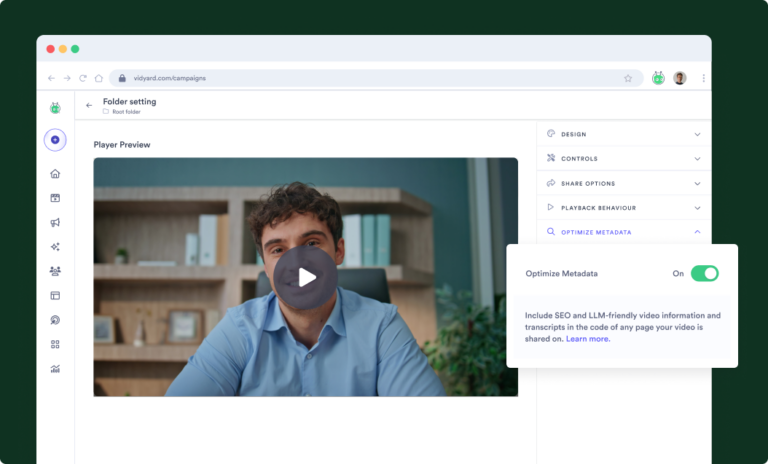
The fix is to give AI the same signals it uses to understand a webpage. Optimizing your video metadata adds those signals, so your video content can start showing up in AI generated search results and LLM recommendations.
The shift in search
Buyers aren’t just scrolling results anymore, they’re asking AI tools directly and getting an answer handed to them. 71% of B2B software buyers now use AI in their vendor research. And when a vendor gets cited in an AI answer, it carries real weight, 85% of B2B software buyers think more highly of a vendor when AI cites them in a response.
For years, marketers asked: can people find my video? Now there’s a second question that matters just as much: can AI understand it? If AI can’t understand your video, it can’t recommend it, cite it, or surface it to a buyer who’s asking the exact question your video answers.
Why AI can’t watch your videos
Search engines and AI tools are good at reading text. A webpage is built from text, so it’s naturally legible to a crawler. It can read the headline, the body copy, the headers, and figure out what the page is about.
Video doesn’t work that way. A video is a media file, not text. Drop one into a webpage and AI has no built-in way to know:
- What the video actually covers
- Who it’s meant for
- What format it is (demo, webinar, customer story)
- What questions it answers
- Why it’s relevant to the person asking
None of that is a flaw in your video. It’s just a gap in how the content gets described to a machine. Google’s guidance on VideoObject schema and Microsoft’s guidance for Bing and Copilot both point to the same fix: video hosted with structured data. Without it, even a great video sits invisible next to text content that AI can read easily.
Hosting videos on YouTube vs. your site
Structured data solves what AI can read, but where that video lives still matters. You can put your video on YouTube, and for pure reach, you probably should. But there’s a catch most teams miss.
When you embed a YouTube video on your site, search engines and AI index the version hosted at youtube.com, not the one on your page. If that video gets cited or ranked, the click doesn’t come to you. It goes to a YouTube watch page, surrounded by recommended videos, half of them your competitors.
Hosting your video on your own domain keeps the indexable version, and the traffic that follows it, on your site. When AI or search surfaces that video, the buyer lands in your funnel.
There’s one more thing YouTube can’t do, tell you who watched. Vidyard ties video engagement to real contacts in your CRM, so a view becomes pipeline intelligence your sales team can act on, not just a number in an analytics tab.
How AI understands your videos
There are two different experiences happening around every video you publish.
What people experience: the visuals, the narration, the story, the content itself. That’s the layer built for humans, and it’s where most production time goes.
What AI and search experience: the title, the description, the transcript, the tags, and the structured metadata sitting around that video. For a lot of teams, that layer is an afterthought.
Both layers are answering the same core question: what is this video actually about? People get that answer by watching. AI gets that answer from the text signals around the video.
Clearer signals help AI understand and surface your content. What optimizing metadata does is give your video an opportunity to be understood. A video AI can’t read is a video AI can’t recommend.
What marketers are really trying to solve
Strip away the jargon and most marketing teams are chasing the same handful of outcomes.
Help people discover our videos. You’ve published dozens or hundreds of videos across webinars, demos, and customer stories. Most of them are sitting there with no plan for anyone new to find them.
Improve visibility in AI search. Your team has spent years on SEO. Now there’s a whole new surface, AI answer engines, and most video content hasn’t been set up for it at all.
Capture more non-brand demand. Someone asks ChatGPT a question your product solves, and your competitor’s content gets cited instead of yours. That’s demand you’re losing before a prospect ever hits your site.
Scale without creating more manual work. Nobody has time to write custom metadata for every single video by hand. Whatever the fix is, it has to work at the scale your video library already exists at.
AI search discoverability is now a marketing-wide responsibility
Search discoverability used to sit almost entirely with the SEO team. Now it touches nearly every role in marketing.
| Role | What video in AI search means for them |
|---|---|
| CMO / VP Marketing | Needs visibility into how the brand shows up in AI answers, not just organic rankings |
| Demand Generation | Has to think about AI search as a new top-of-funnel channel, alongside paid and organic |
| Product Marketing | Needs product and use-case language written in a way AI can pull into an answer |
| Content Marketing | Owns making sure every published video has the text signals AI needs to understand it |
| Digital Marketing & SEO | Extends existing technical SEO practices to cover structured data for video |
| Marketing Operations | Needs a scalable, repeatable process instead of one-off manual fixes for campaigns with video |
No single role owns this by themselves anymore. The teams that move fastest are the ones who stop waiting for someone else to fix it.
5 ways to optimize video metadata for AI search
- Write descriptive titles. A title should say plainly what the video covers, not just tease it. AI uses the title as one of its strongest signals for what the video is about.
- Write meaningful descriptions. A short, generic caption doesn’t help. A clear description that explains the topic, the audience, and the format gives AI something real to work with.
- Publish full transcripts. A transcript turns your video into readable text. It’s the single biggest thing you can do to make a video legible to AI.
- Use consistent tags. Consistent tagging across your video library helps AI (and your own team) understand how videos relate to each other and to specific topics.
- Expose structured metadata. Structured data, like VideoObject schema, tells AI exactly what type of content it’s looking at in a format built for machines to read.
Doing all five by hand, across an entire video library, isn’t realistic for most teams. Platforms like Vidyard automate this, so your videos get these signals without adding manual work to your team’s plate.
The next chapter of video marketing
We spent years optimizing content for people, then for search engines. Now it’s AI’s turn to understand what we’ve made.
Your videos already do the hard work of explaining your product and telling your customers’ stories. The only thing missing is a way for AI to read that work.
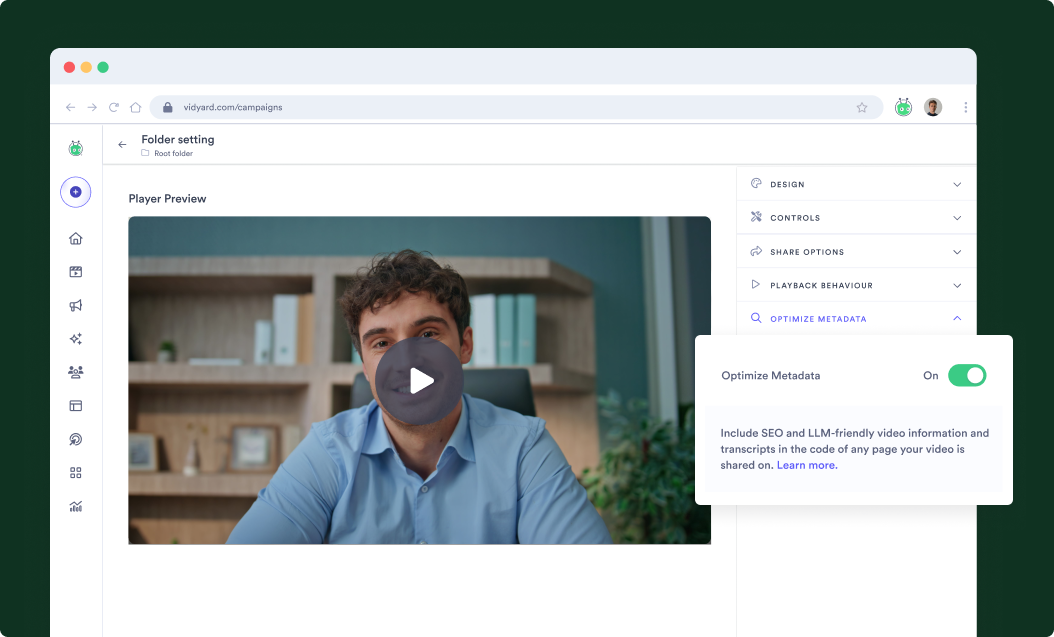
Optimizing your video metadata with Vidyard takes minutes, not a new workflow. Vidyard can automatically expose each video’s title, description, transcript, and tags as structured data AI and search engines can read. You can apply settings across an entire folder or customize individual videos, and it works with all the ways you embed and share video without changing how you already publish. That way your videos can still live on your own site, so you keep the traffic instead of sending viewers to a third-party platform.
Want to make your video content easier for LLMs to discover with Vidyard’s metadata optimization? See it in action.
Frequently asked questions
How do I get traction on ChatGPT, Google and other AI search engines?
Give your videos clear, complete text signals: descriptive titles, real descriptions, full transcripts, and structured metadata. That’s what both traditional search and AI answer engines rely on to understand and surface content.
Can AI answer engines cite my videos?
Yes, AI answer engines can cite video content when they can read and understand it. The more clearly a video’s metadata explains what it covers, the more likely it is to be surfaced in a relevant answer.
What information is included when I optimize my video metadata?
Optimizing metadata typically includes the video title, description, transcript, tags, and structured data like VideoObject schema, the same signals covered in the five ways above.
Should I host my videos on YouTube or on my own site?
You can host on YouTube, and for reach, it’s worth doing. Just know that search engines and AI cite the version hosted on youtube.com, not the one on your page, so that traffic goes to YouTube instead of your site. Hosting on your own domain keeps the click, the funnel, and the viewer data yours to act on.
Does optimizing video metadata work with every video?
It works best on videos with real spoken or written content to draw a transcript and description from, such as webinars, demos, and customer stories.
How do I know which videos to optimize?
Start with your highest-traffic or highest-intent videos, like product demos and customer stories, then expand to the rest of your library over time.
Does optimizing video metadata guarantee rankings or AI citations?
Optimizing metadata gives AI the information it needs to understand your video, but no platform can guarantee a ranking or a citation in an AI answer.