



VIDEO IN MOTION BENCHMARK REPORT

Video plays and best practices for modern marketing teams

The marketing teams generating more pipeline, engaging buyers, and getting found by the right audiences have one thing in common: video is built into every stage of their pipeline.

Eight plays built for marketing teams. Get real benchmarks, proof points, and scripts for turning demand into pipeline.

VIM benchmark report-marketing

INTRODUCTION

Video is revenue infrastructure for the teams winning right now

The modern revenue motion is fragmented. Too many channels, too little personalization, too much noise competing for the same attention span.

Video is what holds it together.

From the moment a prospect fills out a form, to the webinar they register for, to the content they find through AI search, video is the thread that runs through every stage of the marketing funnel. Teams that treat it that way are the ones pulling ahead.

This guide is not an argument for why video matters, that argument is settled.

Marketing teams who use video see

50%

more responses with cadences that include at least one video

300%

higher click-through rates

38%

higher win rates

50%

webinar attendance rate using video reminders before the event

27%

higher engagement overall

This report breaks down video strategies and plays for marketing teams, with the benchmarks to know when video is working and the proof points to back it up.

HOW TO USE THIS GUIDE

Start where you are

This is a reference document. You do not need to read it cover to cover, instead use the guides below to find your starting point.

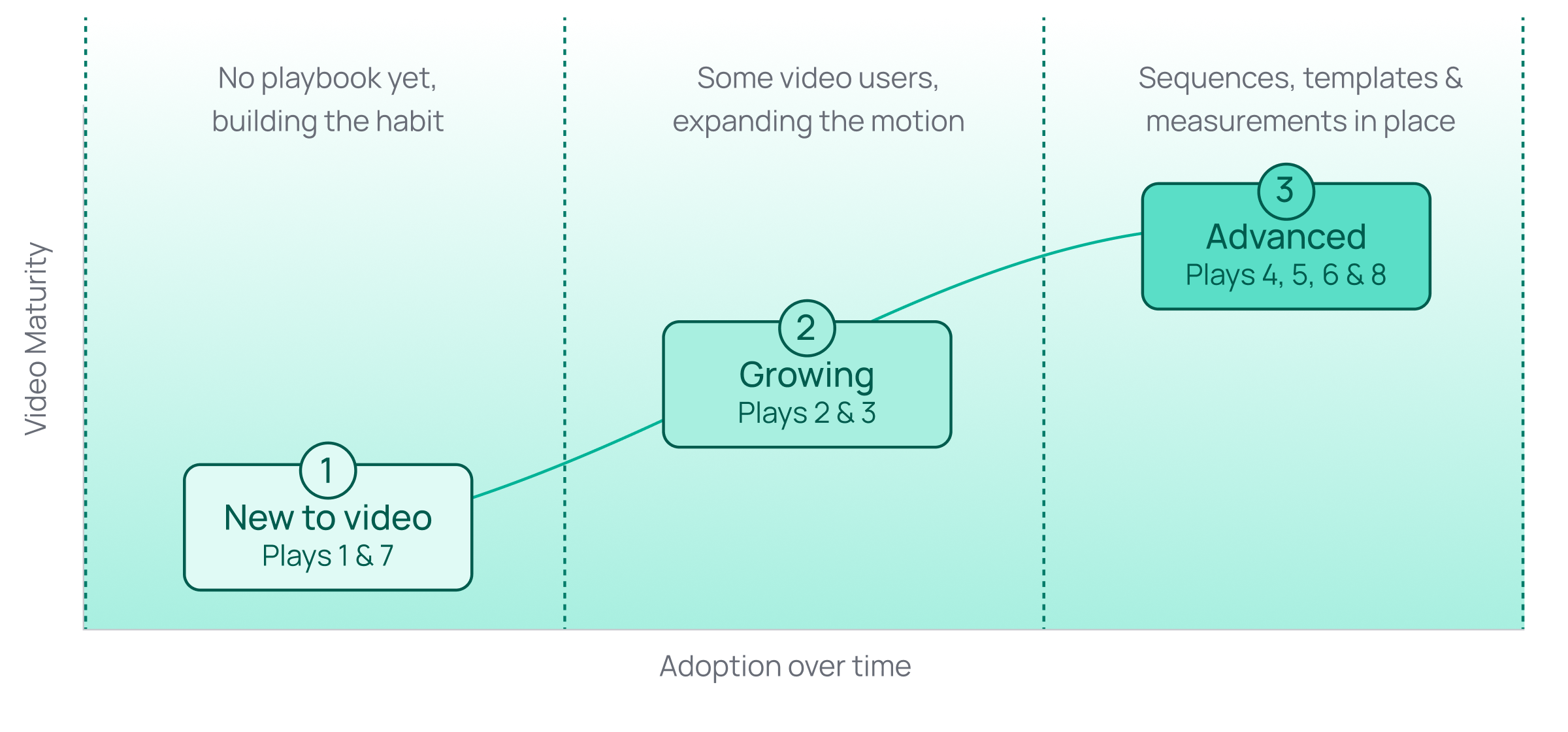
video-maturity-graph-marketing

Video maturity stages

STAGE 1: NEW TO VIDEO

Your team is not using video consistently. There isn’t a defined playbook and leadership has not fully bought in.

Start with Play 01 (instant response to inbound leads) and Play 07 (meeting confirmation). These are the highest-volume, lowest-effort entry points: a personalized reply the moment someone fills out a form, and a confirmation video the moment a demo gets booked. No new tooling required, just a person, a camera, and a script.

STAGE 2: GROWING

A few campaigns use video, but it isn't standard practice yet.

Layer in Play 03 (ABM) to make named-account outreach feel individually built, then extend into Play 02 (events and webinars) to convert the traffic your events are already generating.

STAGE 3: ADVANCED

You have sequences, templates, and some measurement in place, but you want to go deeper.

Start with Play 04 (on-demand webinar programs) and Play 05 (embedded product demos) to get more mileage out of content you've already built. Play 06 (AI search visibility) is where most marketing teams aren't looking yet for their video strategy, this is where you can get ahead. Once a few of the plays above are running consistently, Play 08 (Video Agent) is the next step regardless of which stage you started at, automate the ones that are already proving out.

Find your role, find your plays

Your role Go here first
Demand generation Play 02, Play 03, Play 04, Play 05
Growth marketing / ABM Play 03, Play 04, Play 05
Content marketing / SEO Play 05, Play 06
Marketing ops Play 01, Play 07, Play 08

HUMAN ON CAMERA VS. AI AVATARS

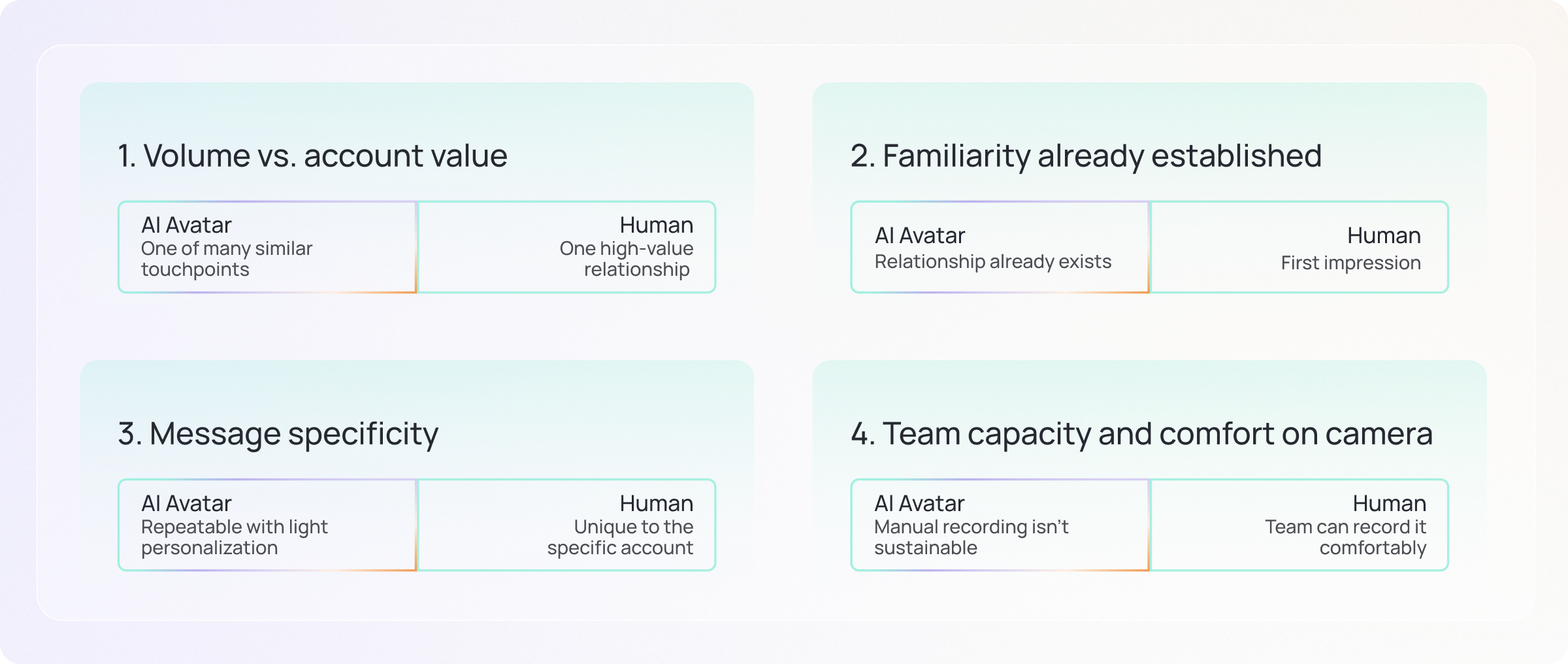
How to decide between human video and AI Avatars

Personalized video can be run one of two ways: a real person on camera, or an AI Avatar standing in for one. The right call depends on the moment and use case. Ask these four questions to help you decide.

01

Volume vs. account value

Is this one strategic account, or one of hundreds of similar leads? A named Tier 1 account on your ABM list deserves a human face. A list of five hundred webinar registrants doesn't need five hundred individually recorded videos to still feel personal.

02

Familiarity already established

Has this person seen your face before, or is this the first impression? Once a relationship exists, an AI Avatar can carry routine updates without spending down the trust a real recording built earlier.

03

Message specificity

Does the content need to reference something unique to this campaign or account, or is it a repeatable message with light personalization?

04

Team capacity and comfort on camera

Is manual recording actually sustainable at the volume this moment needs? An individual who dreads the camera and is expected to record fifty personalized videos a week will burn out or stop doing it. That's a sign to automate, not a failure of the team.

H vs AI- video-in-motion

PLAY 01

Instant video responses to inbound leads

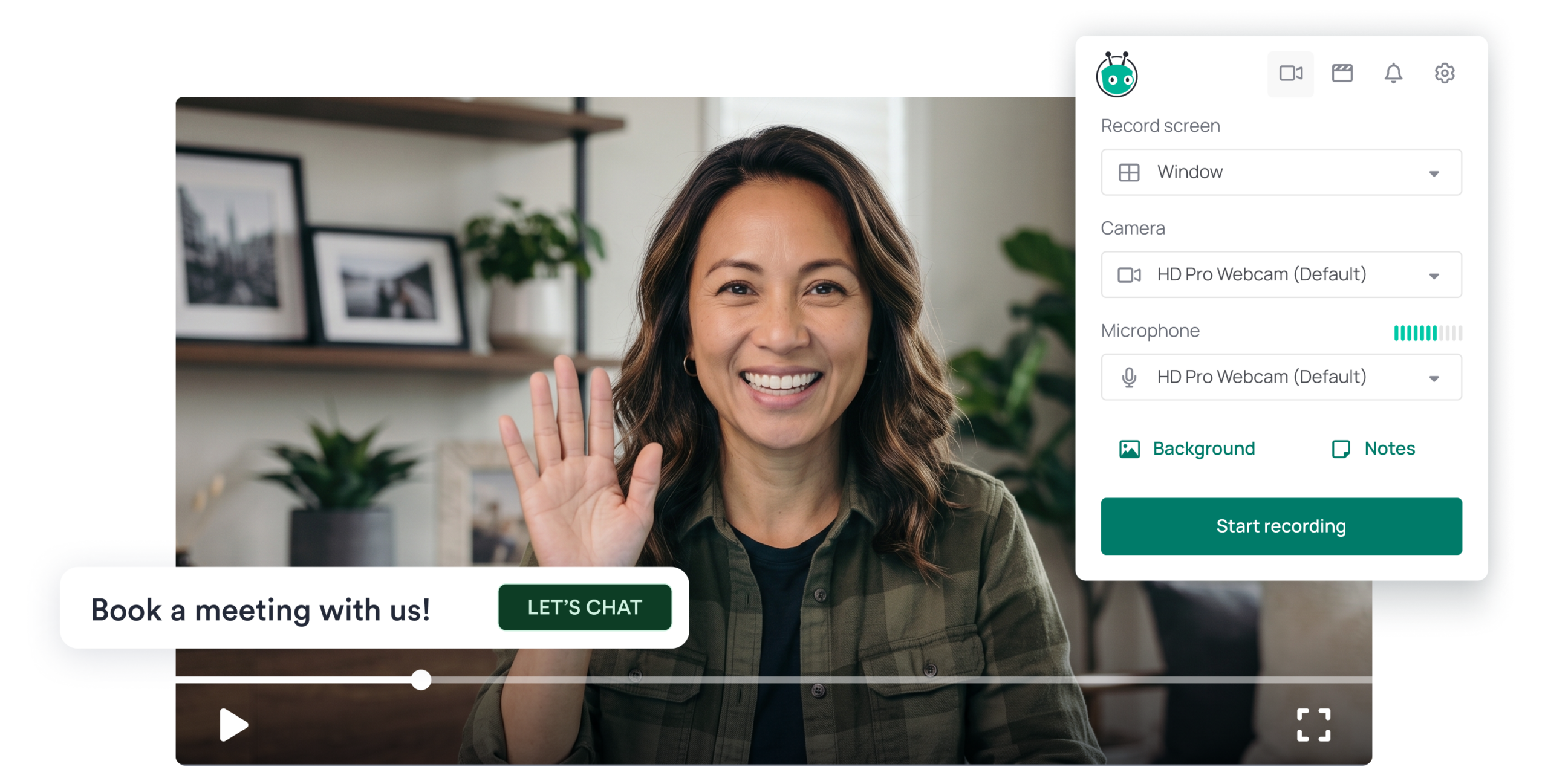
WHO: Demand gen, Growth marketing (in partnership with SDR/BDR) WHEN: The moment gated content is downloaded, a form is submitted, or a demo is requested.

Speed alongside a real face beats a generic autoresponder.

Why does response speed make or break an inbound lead?

The average B2B lead response time is 42 hours, nearly two full business days after a prospect raises their hand. By then, the window has already closed. 78% of B2B buyers purchase from the vendor that responds first (6sense), and the chance of qualifying a lead drops by 80% after the first five minutes (InsideSales).

Speed alone isn't the whole answer. A fast, impersonal response can be just as forgettable as a slow one. What actually converts at peak intent is a response that feels like it came from a real person, not a system.

What good looks like

50%

more responses with cadences that include at least one video

< 5min

response time (80% drop in qualification chance after the first 5 minutes)

When we used this same automated approach at Vidyard to follow up with prospects who visited a booking page but didn't complete scheduling a demo, 1 in 4 of those otherwise lost prospects converted to MQL with no rep involvement.

“Every hour a lead sits in a queue is an hour a competitor has to reach them first. Automating the first video response ensures the rep's face is the first one the prospect sees."

Sakshi Singh

Director, Growth and Demand Generation,

Vidyard
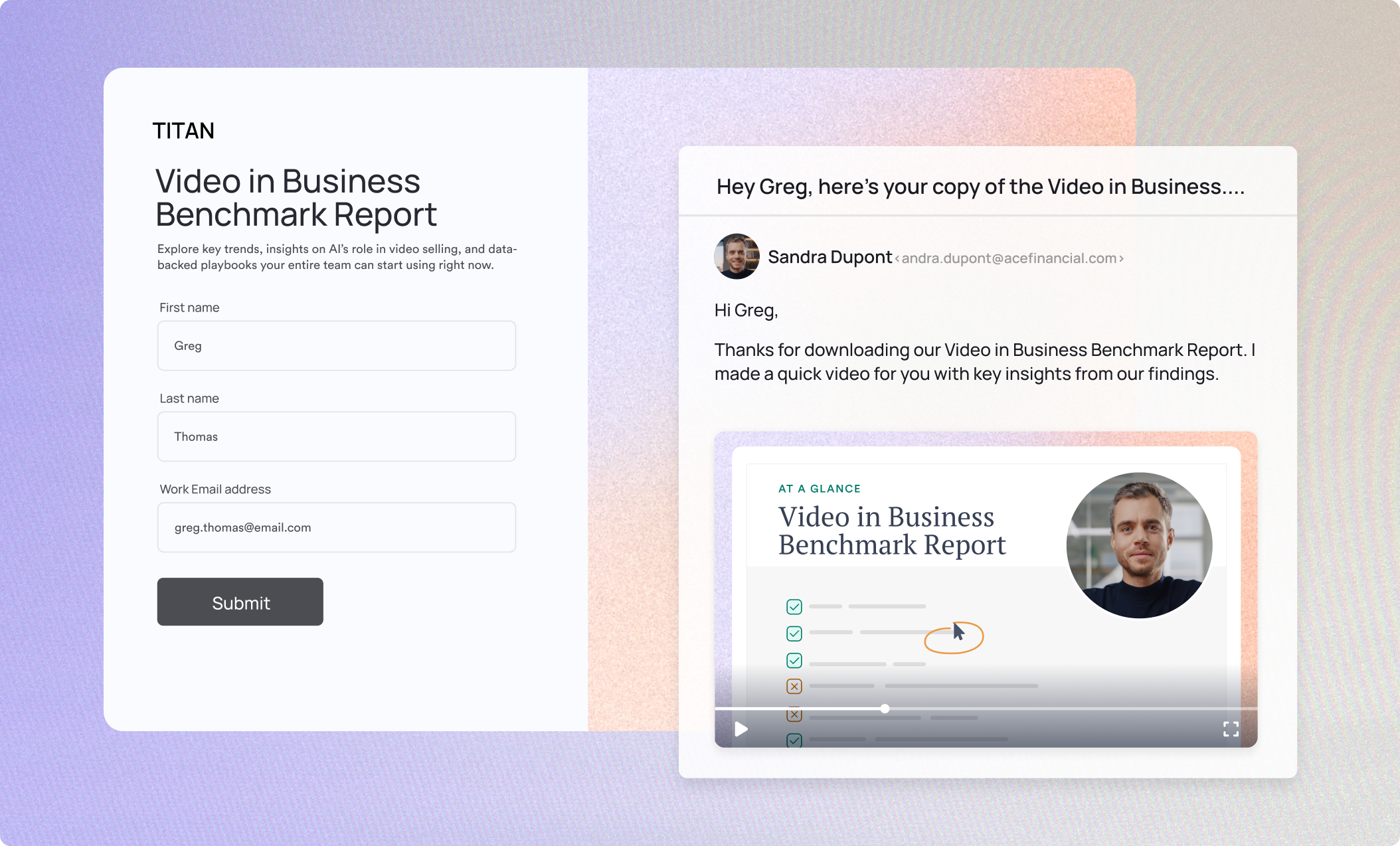
Script template: automatically sent after a gated content download

Hi [First Name],

Thanks for downloading [content title]. I'm [Your Name] from [Company Name], here to help if any of it raises questions. 

Teams like [Company Name] usually start by looking at [standard next step tied to this asset]. 

If it'd help to walk through how that applies to you, grab time using the link below.

How to measure this play
  • Reply rate on video-first vs. text-first responses
  • Meetings booked from instant video follow-ups
  • MQLs from form fills (such as gated content downloads)
Inbound leads- video-in-motion

PLAY 02

Video for events and webinars

WHO: Demand gen, Content, marketing, Marketing ops WHEN: Webinar invites, post-event follow-up, form fills, and content downloads.

Stop letting event pipeline go cold and use video to stand out.

Why does video convert event pipeline better than email?

Most marketing teams invest heavily in events and content. Far fewer invest in what happens right after. A prospect who gets a personalized video follow-up the same day a webinar ends is far more likely to convert than one who gets a templated email three days later. A prospect who sees a 60-second teaser from the actual presenter before the event already has a connection before it starts.

Video at this stage isn't a nice-to-have layer on top of demand gen. These are just some of the touchpoints you can automate with video for events and webinars:

  • Presenter teasers going out to the invite list
  • Personalized thank-you videos firing to attendees within hours of the event ending. 
  • No-show re-engagement can trigger automatically based on the event attendance data. 
  • Immediate follow ups are triggered when people watch the hosted recording, catching intent while it's warm.
What good looks like

50%

webinar attendance rate using personalized video reminders before the event (up from a 30-40% baseline)

2x

higher reply rate on follow-up outreach to prospects who attended a video event vs. standard outreach

Script template: webinar presenter teaser

Hi [First Name], 

I'm [Presenter Name], and I'm running [event name] on [date]. 

I wanted to share one thing we're going to cover that I think is directly relevant to what you're working on: [one specific insight or takeaway]. 

If that's a problem you're thinking about right now, I'd love to see you there. Registration link is below.

Script template: post-webinar follow-up for live attendees

Hi [First Name],

Thanks for joining [event name] today, really glad you could make it. If anything resonated or sparked a question, I'd love to keep the conversation going. 

Reply here or grab some time using the link below.

How to measure this play
  • Webinar registration rate: video invite vs. standard email
  • Webinar attendance rate with vs. without pre-event video reminder
  • Post-webinar pipeline created from video follow-up sequences
  • Reply rate: video follow-up vs. text-only for live attendees
  • Re-engagement rate: no-show video vs. standard recording email
  • Content engagement rate when paired with a video walkthrough

PLAY 03

ABM personalized video

WHO: VP Marketing, Demand gen, Growth marketing WHEN: Product launches to a relevant list, executive outreach, expansion or renewal campaigns.

Make outreach to your named accounts feel individually built, not mass-produced.

Why does personalized video move named accounts faster?

Account-based marketing has moved from a niche tactic to the default motion for named-account selling, 90% of organizations have an ABM strategy (Martal). Most teams that run ABM still treat every account the same way regardless of tier, which is exactly where personalized video earns its place. 

For top-tier accounts, teams tend to hand-record a genuine 1:1 video from a rep or exec. For broader tiers, teams increasingly use templated or AI-assisted variants with dynamic fields to keep relevance at higher volume. The value depends less on making the video than on whether engagement data flows back into the CRM or MAP fast enough for sales to act on it.

What good looks like

35%

win rate boost

27%

shorter deal cycles

28%

pipeline increase, video paired with agentic AI

Treering, a custom yearbook and keepsake company, runs a fully remote team and needed customer outreach that felt as personal as their product. A recent personalized video campaign hit a 94% open rate and a 53% click-through rate.

“When you see a video made for you, you're going to click it."

Erika Lin Payne

Marketing Manager,

Treering

Read the case study

Script template: feature launch to tier 1 account list

Hi [First Name],

[Your Name] from [Company Name] here. We just shipped [feature name], and I thought of [Company Name] specifically because of [account-specific context: a stated priority, a recent initiative, a known pain point]. 

Here's the two-minute version of what it means for your team: [specific outcome]. 

Worth 15 minutes to see it against your actual use case?

How to measure this play
  • Account-level engagement
  • Meeting rate after sending email with video
  • Campaign to video view attribution

PLAY 04

On-demand webinar programs

WHO: Demand gen, Campaign manager, Content marketing WHEN: Virtual events needing extended reach, evergreen top-of-funnel programs.

Turn a single live event into a long-running content asset.

Why does the on-demand version matter just as much as the live event?

The traditional webinar model treats the live event as the deliverable and the recording as an afterthought. Modern marketing teams invert that. The live event becomes raw material for a much longer-running on-demand asset, hosted on a dedicated page and tracked for engagement long after the live date.

On-demand viewing now accounts for roughly 50% of all webinar attendance (ON24). But without the right hosting in place you’re not able to see the signals your on-demand views are telling you.

Vidyard Hubs give your on-demand content a branded, customizable home, with analytics so you can see who watched, how much, and when. With these insights, on-demand views stop being a number on a dashboard and start being a signal your team can act on.

What good looks like

~50%

of total views are now from on-demand hosted videos

How to measure this play
  • On-demand video views
  • Engagement and watch time on on-demand videos
  • CTA clicks from on-demand videos
Hubs Hero

PLAY 05

Embedded CTAs on video product demos

WHO: Digital marketing, Product marketing, Demand gen, Content marketing WHEN: Demo pages with plateaued conversion, homepage or top-of-funnel explainer placements.

Build the call to action into the video itself, instead of waiting for the viewer to finish and click away.

Why do in-video CTAs convert better than one below the player?

Embedding your CTA into the video player itself ensures the viewer sees it with context without requiring them to scroll or click away first. 

Placement of the CTA within the video matters and is worth testing. The end of the video is consistently the strongest spot, because a viewer who stayed that long has already self-selected as engaged. This may vary though depending on the context and pace of your video.

With Vidyard Hosting you can customize your CTAs and their timing to ensure they are appearing at the ideal moment.

What good looks like

4x

more meetings booked after adding in-video CTAs

40%

of sales conversions driven by video

“I care a lot more about the CTA being embedded into the video, like the fact that I can take them to my meeting link at the end. Even if they don’t convert, it’s so much easier to ask for the meeting after that and to get a yes."

How to measure this play
  • Embedded CTA click-through rate
  • Embedded CTA conversion
See all features section

PLAY 06

Increase your visibility on AI search while keeping prospects on your site

WHO: VP Marketing, Demand gen, Growth marketing, Content marketing, SEO/AEO team WHEN: When video content is scattered across YouTube, and internal tools, or when organic search traffic is slipping due to AI search.

Get your videos back on your own site and make it easier for AI to find and cite them once they're home.

Why does hosting your own video matter more than it used to?

If your organic traffic or content engagement has been slipping, AI search is a major factor. When someone gets their answer directly from an AI Overview or a chat tool, they often never click through to a website at all. 

And when your videos are on YouTube, search engines and AI index that version. If that video gets cited or ranked, the click doesn’t come to you. It goes to a YouTube page, surrounded by recommended videos, half of them your competitors. 

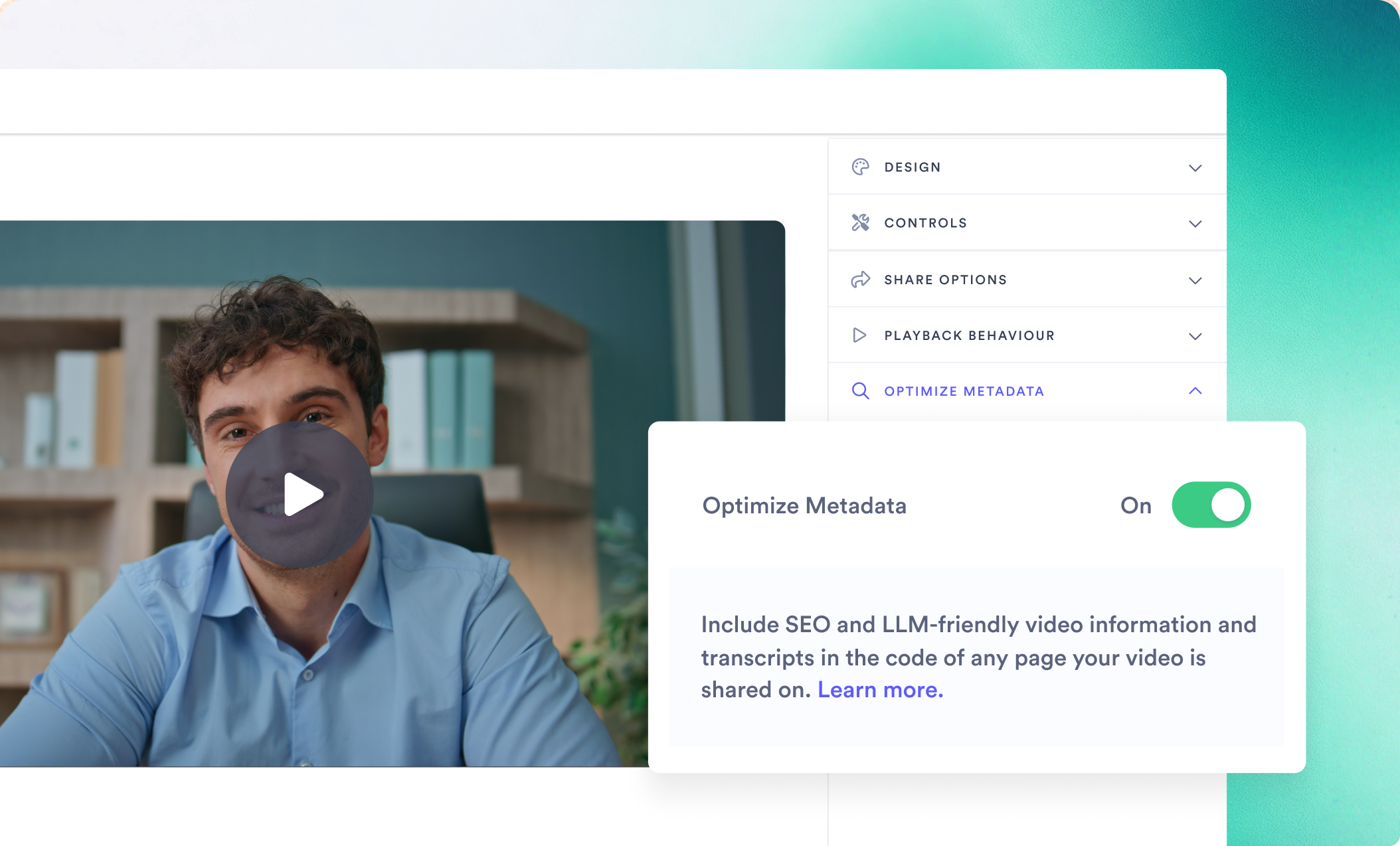
Hosting your video on your own domain keeps the indexable version, and the traffic that follows it, on your site. But how do you help AI understand and find the videos on your own site?

Search engines and AI tools are good at reading text, but video doesn’t work that way. A video is a media file, drop one into a webpage and AI has no built-in way to know what it’s about. That’s not a flaw in your video, it’s just a gap in how the content gets described to a machine.

Vidyard Hosting automates adding metadata to your videos, so that your videos get these signals without adding manual work to your team’s plate. That way your videos can stay on your own site while staying eligible for citation in AI search.

What good looks like

71%

of B2B software buyers now rely on AI chatbots somewhere in their research process (G2, 2026)

85%

of buyers think more highly of a vendor when an AI chatbot cites them in a response (G2, 2026)

“For years the question was: can people find my video? Now there's a second question that matters just as much: can AI understand my video? If AI can't read your video's metadata, it can't recommend it, no matter how good the video is."

Zoe Janssens

Content Marketing Manager,

Vidyard

How to measure this play
  • Views and engagement on videos hosted on owned pages
  • Retrievals and citations of your content in AI search
meta tags- video-in-motion

PLAY 07

Meeting confirmation video

WHO: Demand gen, Marketing ops, ABM WHEN: Immediately after a meeting is booked.

Make sure the meeting your campaign booked actually happens.

Why does a confirmation video reduce no-shows?

B2B meeting held rates typically sit between 60-80%. That means even strong teams lose 20-40% of the meetings they book. Multiply that by your average deal size and you start to see it as a real revenue number, not a percentage.

Most teams treat the confirmation as admin: a calendar link, a system notification, a reminder that fires and gets dismissed. But from the buyer's perspective, what happens between booking and the call is a decision journey. And in that window, nothing has made the meeting feel worth protecting. A short personal video sent right after booking changes that.

The prospect sees the person they are meeting, hears what the call will cover, and feels a sense of connection before the conversation ever happens. A calendar event becomes a real commitment.

What good looks like

33%

reduction in no-show rate

70-77%

open rate on automated meeting confirmation emails

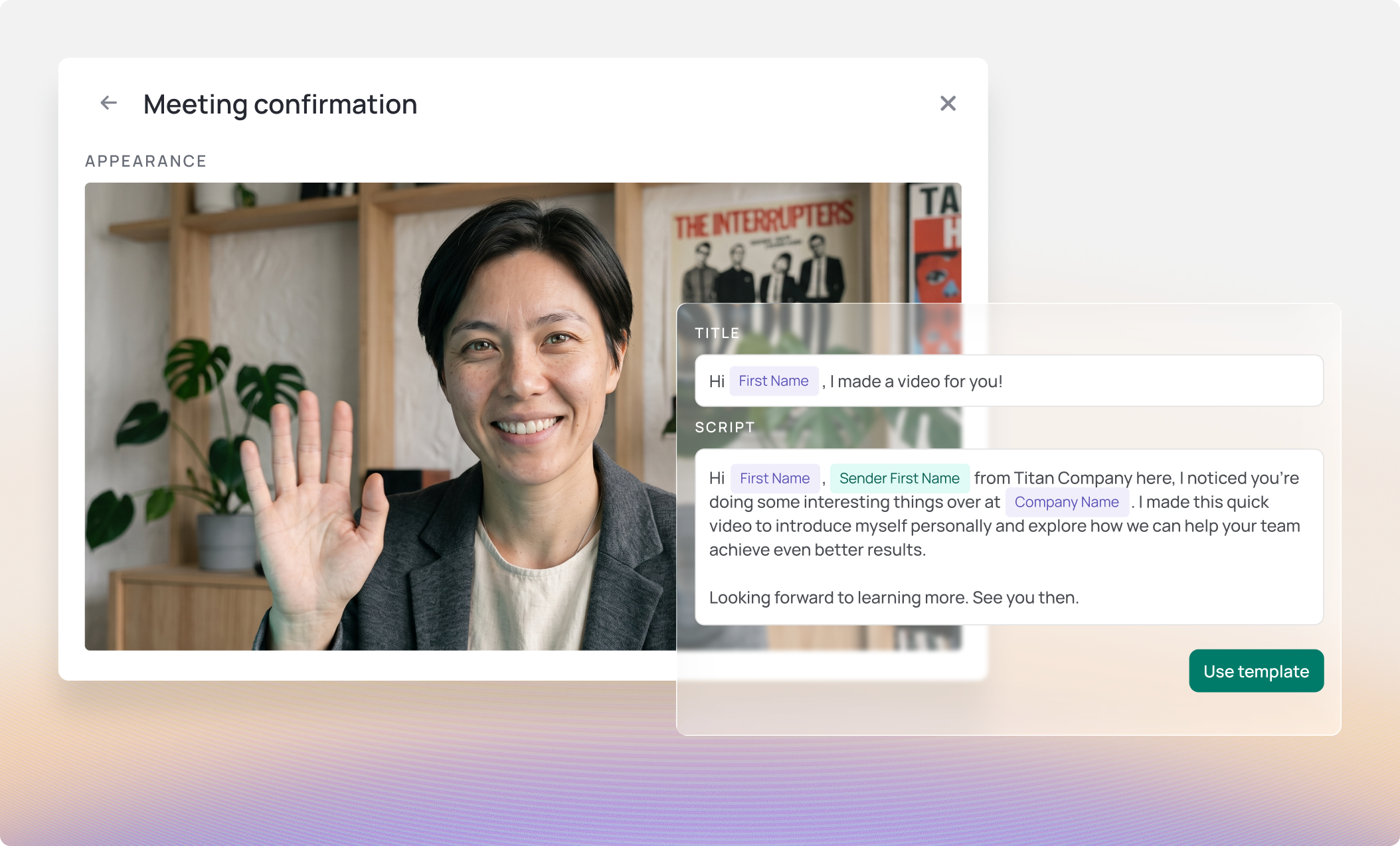
We used this exact play at Vidyard using Video Agent for automated meeting reminders and the payoff was immediate. In the first month, our no-show rate dropped by a third. Why did this video play work better than a standard reminder? A calendar notification says, “You have a meeting.” A personalized video says, “A real person is expecting you.”

“The prospect gets to pre-meet the rep they'll see on the call, which creates a more seamless experience and a real commitment."

Sakshi Singh

Director, Growth and Demand Generation,

Vidyard
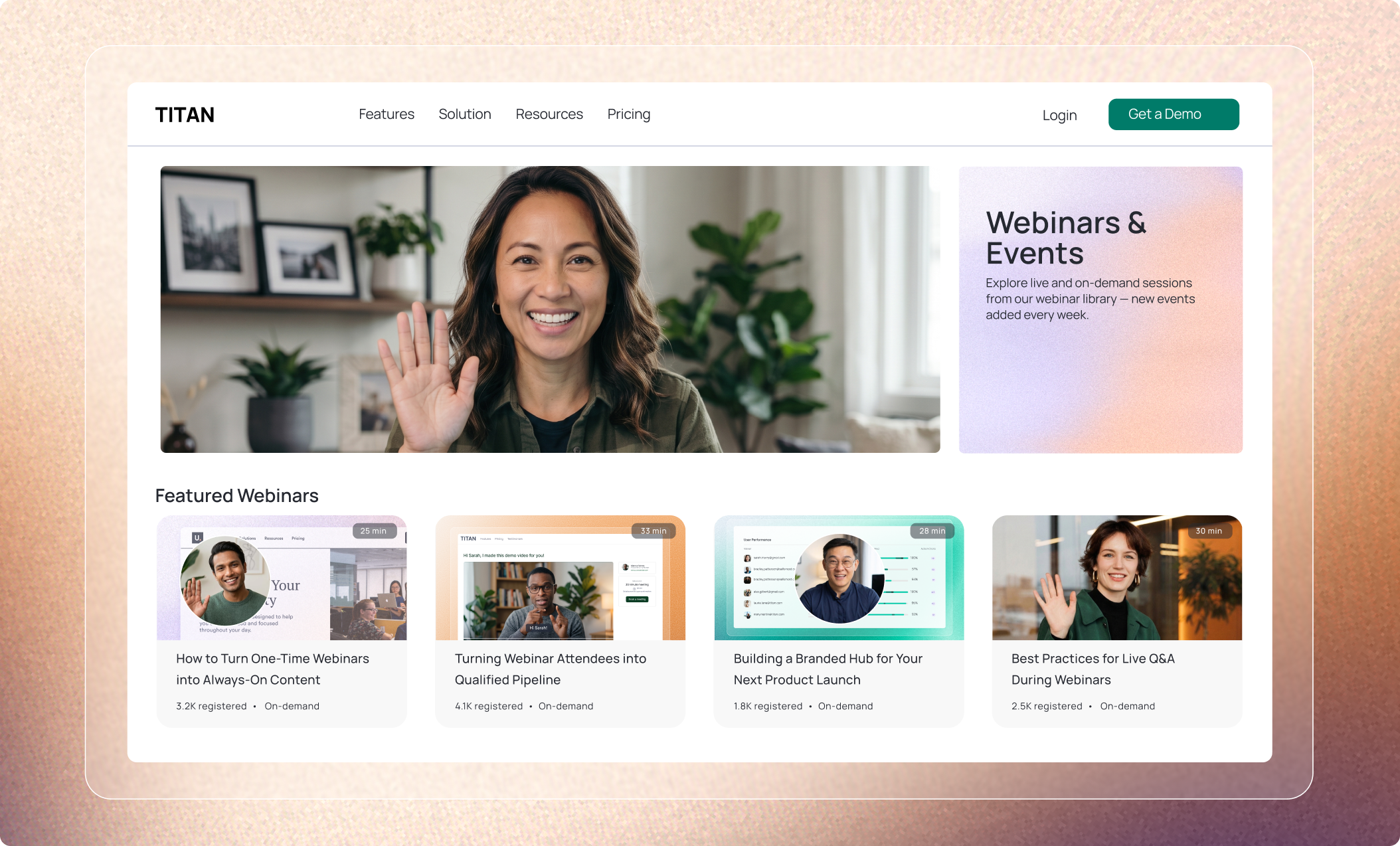
Script template: confirming a booked meeting

Hey [First Name],

[Your Name] from [Company Name] here, I noticed you're doing some interesting things over at [Company Name]. I made this quick video to introduce myself personally and explore how we can help your team achieve even better results.

Looking forward to learning more. See you then.

How to measure this play
  • No-show rate before and after video confirmations
  • Meeting attendance rate by sequence type
  • Re-book rate when a no-show receives a video follow-up
video-agent-VIM-report

PLAY 08

Scale what's working with Video Agent

WHO: Demand gen, Marketing ops, Growth marketing WHEN: When the plays above are working and the bottleneck is capacity, not quality.

Stop choosing between personalization and scale.

Why does scaling video require automation?

Every play in this report is more powerful at scale. But scaling without personalization is just more noise. Video Agent triggers personalized video from real buyer behavior signals, like a form fill, a webinar registration, or a booked demo.

At Vidyard, embedding Video Agent across our own marketing motion delivered three clear results across three different use cases: no-show rates dropped by 33%, inbound lead response scaled without adding headcount, and webinar attendance climbed to nearly 50%.

Start with one trigger. Meeting confirmation is the lowest-effort entry point: high ROI, minimal setup, immediate impact on no-show rates. Once that's running, expand to inbound lead response, then event and webinar reminders. Build the motion before you scale it.

What good looks like

33%

reduction in no-show rate once Video Agent runs meeting confirmations

50%

webinar attendance rate once Video Agent runs pre-event reminders

Choosing between AI Avatars and human videos

While some moments can be automated with AI Avatars, saving your team time, some moments are more suited for a human filmed video. Here’s some examples of when to use each.

Use AI Avatar when... Record manually when...
Sending an inbound lead follow-up to a high volume of form fills Reaching out to a Tier 1 ABM account for the first time
Confirming a meeting booking with a personalized reminder Following up with a champion mid-campaign, where the relationship matters
Sending a post-webinar follow-up to everyone who attended Recording a presenter teaser, where personality and credibility carry the message
Nurturing a lead who downloaded content or filled out a form Delivering an account-specific ABM video for a strategic account
Re-engaging a webinar no-show Introducing a new campaign to an executive stakeholder for the first time
How to measure this play
  • Videos sent per campaign with Video Agent vs. without
  • Pipeline influenced by Video Agent-triggered touchpoints
  • Conversion rate for Video Agent-assisted sequences vs. standard sequences
  • Hours reclaimed per team member per month

REFERENCE

What good looks like

Every benchmark from every play in one place. Use these to set targets, measure results, and know when your video strategy is working.

Play What to measure What success looks like
Play 01: Instant response to inbound leads Reply rate 50% more response with video in the cadence
Play 02: Events and webinars Webinar attendance rate ~50%, up from a 30–40% baseline
Play 03: ABM personalized video Win rate 35% win rate increase
Play 04: On-demand webinar programs On-demand share of attendance ~50% of total views are now on-demand
Play 05: Embedded product demos Meetings booked 4x more meetings booked after adding in-video CTAs
Play 07: Meeting confirmation video No-show rate Up to 33% drop
Play 07: Meeting confirmation video Confirmation email open rate 70-77% open rates

NEXT STEPS

You do not need to run all the plays at once

The teams that build a video motion do not build it all at once. They start with one play, prove it works, and roll from there.

Step 1: Pick one play

New to video? Start with one play that you think will have the highest ROI for your team, run it for 30 days and measure the results.

Step 2: Roll it out

Once you’ve proven out a play, share it with your team. Set one benchmark to beat, run it and then review your results. The best adoption stories start with one win, and a "wait, how did you do that?" moment.

Step 3: Scale when you are ready

When a play is working, Video Agent multiplies the output without multiplying headcount. Automate the repeatable work so your team can spend time on the conversations that actually close deals and keep customers.

Put the plays in this guide to work