Prospecting and Intros
Stand out and improve response rates.
 Sales
SalesGenerate more pipeline and close more deals.
 Sales Support
Set your sales team up for success.
 Marketing
Host video content and convert viewers into leads.
 Converting and Closing
Connect with buyers and close more deals.
 Corporate Comms
Create and deliver an internal communications strategy.
See Vidyard in Action →
“Personalized Vidyard video messages drove an 8x improvement in click-through rates and a 4x improvement in reply rates.” Read More
 Blog
BlogThe secrets to virtual selling and video best practices.
 Video Agent Hub
Case studies and how-to videos for every revenue use case.
 Knowledge Base
How-to and help articles for all things Vidyard.
 Fast Forward
Expert advice on all things virtual selling.
 Templates
Free sales templates for every stage of the deal cycle.
 FAQ
FAQGet the answers to your top Vidyard questions.
 AI Resource Hub
Guides and ideas for using AI in your workflow.
 Case Studies
Learn how our customers win more with Vidyard.








How to Use Video CTAs to Drive Conversions
Jul 15, 2023
·
6 min read

Lori Connor

Is your video marketing content driving next steps, or is it springing leaks in your marketing funnel? Learn how to start using video calls to action to boost your conversions.
“Sign Up for an Account.” “Download the eBook.” “Book a Demo.” You probably already know all about the call to action. When you’re presenting a piece of content, you always want to include a compelling CTA that drives the next step. But are you using video calls to action the right way?
Just adding a CTA to the video’s webpage often isn’t enough. When you finish watching a video, how often do you pore over the rest of the page to find the CTA? Many viewers are gone the moment the video ends.
Marketers like you need to master driving engagement right from your videos. Feeling a little lost on the best way to serve up that CTA in relation to your video content? Read on.

Get exclusive insight into how sales teams use AI-powered video. (Plus bonus playbooks to get you started.)
Register for your free report
Fill out this form to get your copy of the 2025 Video in Business Benchmark Report.
What’s a Video Call to Action, Anyway?
In a nutshell, video calls to action are areas of the video that have been created specifically to actively engage your viewers. They’re meant to drive a specific desired action while the viewer is watching your video.
Here’s an example you’ve probably seen (or heard) before on YouTube: “Subscribe and ring that bell!”
Translation: “Subscribe to my channel and opt into notifications, so you’ll always get informed when I upload future videos.”
This visual or verbal in-video CTA is often paired with an in-video Subscribe button. When you click on the button visually overlaid on the video, it subscribes you to the channel, just as if you’d clicked the traditional Subscribe button just below the video player.
In Vidyard customer surveys, users always cite adding CTAs to videos as one of the most important features a video platform can offer. It reduces the friction involved in following through on that CTA: The easier and more obvious the action is for a viewer to take, the more likely it is that they’ll take it.
No CTA in your video? Your video content’s probably springing leaks in your marketing funnel. Here’s how to plug them.
What Video Call to Action Should I Use?
Video calls to action can come in a variety of types: Filling out a form, visiting a specific webpage, watching another video, requesting a demo, and more. It all depends on what part of the buyer’s journey your viewer is in when they’re watching your video.
Want to learn more about which CTAs you should be using and when? Check out our guide.
How to Use Video CTAs on YouTube
Video platforms like YouTube are ubiquitous, but they’re relatively limited when it comes to video calls to action.
You can generally only set up buttons or watermarks that click through to a destination, like your website or product page. Depending on how you set them up, CTAs can also be pretty difficult to notice against a busy video backdrop. Some varieties of CTA require complicated setup through Google Ads.

Contrast that with other video platforms built with business users in mind. YouTube focuses on recommending new content and maximizing ad revenue, while other platforms, like Vidyard, play toward what sales and marketing teams really need, like generating leads and propelling the next steps beyond just suggesting more content.
Platforms like these usually have more robust CTA options, too. Here’s an overview of how Vidyard lets you use video CTAs.
How to Use Video CTAs in Vidyard
Vidyard refers to CTAs as just “Actions.” Our Actions, available with a Pro plan, offer much more functionality than just pushing the viewer to a different video or website.
Here’s what you can do with Vidyard’s Actions:
- Visit a URL. This is the industry standard for video CTAs; sometimes, it’s exactly what you need. The viewer clicks the Action and gets taken to the specified URL, whether a website, landing page, or other asset.
- Reply with an email. When the viewer clicks the Action, it’ll open their default mail client. You can pre-populate the to: field, the default subject line, and the body text.
- Schedule a meeting. The Action links to your calendar management tool so that the viewer can set up a meeting. No email back-and-forth required: Just a couple of clicks, and they’re booked.
You can customize your Actions’ text so the viewer knows exactly what to expect.

Customer Experience Manager Christina Garland walks you through Vidyard’s Actions tool, including examples and best practices for your video CTAs.

Different Types of Vidyard Video CTAs
With Vidyard, your Actions can take several forms, depending on your needs, your skill level, and your Vidyard plan.
Pre-built “Quick Actions” let you select from simple, templated CTAs to apply to your video. They come in three basic formats:
- Fullscreen: Best used as a post-roll CTA to push your viewer to the next action or step after finishing your video.
- Banner: Add a banner CTA to any point in your video for whatever duration you choose. Banners are a great way to catch viewers before they drop off.
- Email gate: Want to capture leads? Use this CTA at the beginning or the end of your video. Add a simple email gate or use a Marketo form to funnel through to your marketing automation platform.
Looking for more advanced video CTA options? Custom Actions lets you build your customized CTA from scratch using HTML and CSS.
Add your calendar to your videos as a CTA. Viewers can book meetings directly with you right from the video window. It’s the perfect tool for your sales team to book meetings with prospects. Check out the Vidyard Knowledge Base to learn how.
Know Who’s Clicking with Action Analytics
With Vidyard, you can go further than just a set-it-and-forget-it CTA. With Vidyard Teams and up, you can track the performance of your Actions via Vidyard Analytics.
Measure how many clicks your Actions are getting, who’s clicking them, and where your best-performing Actions reside.
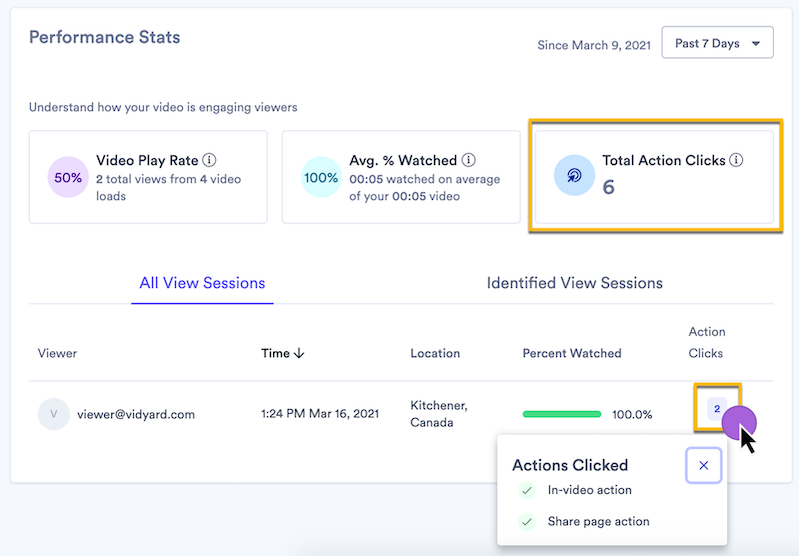
The more you pay attention to engagement metrics and your CTA is relevant to your video content, the more your CTR stands to increase. Understanding who’s clicking and who does not help you qualify your leads, better engage your prospects, and refine your overall marketing strategy to make it more successful.
Get exclusive insight into how sales teams use AI-powered video. (Plus bonus playbooks to get you started.)
Register for your free report
Fill out this form to get your copy of the 2025 Video in Business Benchmark Report.
This post was originally published on July 28, 2021. It was updated on July 15, 2023.