

 Video Messages
Record personal videos to reach more customers.
 Video Agent New
Automatically send personalized videos with agentic AI.
 Vidyard Hosting
Manage all your business videos in one central spot.
 Vidyard AI Avatars
Generate personalized AI videos at scale.
 Vidyard HubsSee All Features →
Curate and share your best videos in one branded page
 Prospecting and Intros
Stand out and improve response rates.
 Sales
SalesGenerate more pipeline and close more deals.
 Post-Sales
Keep customers engaged after the deal closes.
MarketingHost video content and convert viewers into leads.
 Converting and Closing
Connect with buyers and close more deals.
 Corporate Comms
Create and deliver an internal communications strategy.
See Vidyard in Action →
“Personalized Vidyard video messages drove an 8x improvement in click-through rates and a 4x improvement in reply rates.” Read More
 Blog
BlogThe secrets to virtual selling and video best practices.
Video Agent HubCase studies and how-to videos for every revenue use case.
 Help Center
How-to and help articles for all things Vidyard.
 Fast Forward
Expert advice on all things virtual selling.
 Use Cases
Explore real ways to use video across your business.
AI Resource HubGuides and ideas for using AI in your workflow.
 Case Studies
Learn how our customers win more with Vidyard.
 Live Workshop Series
Showing you exactly how to put video to work.







Best Zapier integrations: Automate sales, video, and productivity
Jan 1, 2026
·
8 min read

Kathryn Kosmides

How Zapier integrations can help solve common problems for GTM and revenue teams, including top Zap examples.
TLDR: Uncover top ways to use Zapier integrations to get more out of your existing tools.

Ever had days where your to-do list is clogged up by those tedious tasks?
Copy and paste data from platform A to platform B. Use tool C for sending an email and tool D to track deal progression. Juggle notifications from tools E and F while trying to write a follow-up after that big meeting.
They’re boring, they take you out of your flow, and they’re not making the most of your skills or driving revenue.
But what if…you didn’t have to do them at all? That’s where Zapier can save the day with AI-powered automations that can connect over 8,000 tools together.
The best Zapier integrations help GTM teams increase efficiency, generate real pipeline movement, and scale personalized outreach without heading headcount.
Let’s get into over 20 Zapier integrations for revenue teams, internal communication, and beyond while giving you insider tips on how to choose the best integrations.
How do Zapier integrations work?
Zapier’s value prop is pretty simple: It’s an easy way to connect your apps using automated behaviors, no coding necessary. Zapier integrations use ‘triggers’ and ‘actions’: if a condition is met in one app, something happens in the other app.
What are Zapier Zaps?
Setting up automation using Zapier integrations is actually a lot easier than you might think.
Zaps are what Zapier calls the process of connecting one app to another. Just pick two tools you use and see all the plug-and-play Zaps that already exist along with the ability to customize both triggers and actions.
Think of it like Lego for automation. It can be hard to see how individual pieces are useful. But when you snap them together, you get functional productivity automation that takes care of time-consuming tasks. (Or, in the Lego example, you have a house, a car, or a spaceship.)
Over the years, Zaps have expanded to allow for multiple steps across multiple tools, branching logic, and AI actions including using their AI copilot to automate the creation of custom workflows.
What’s new in Zapier for 2026
If you’ve used Zapier in the past, now is a great time to take another look at how much more juice you could be getting from the squeeze. Over the last year, they’ve doubled down on helping teams enhance their workflows with AI actions, including easily integrating ChatGPT and Claude.
They’ve also improved logic branching, continued to grow their app library, and launched their AI copilot to automate Zap creation. Beyond Zaps, Zapier has introduced other tools including Zapier AI Agents, Interfaces, Chatbots, and Tables.
This makes Zapier far more powerful beyond just “triggers” and “actions” they are known for, but a wide variety of ways to connect tools, collect data, and implement artificial intelligence.
Best Zapier integrations for sales and revenue teams
Sales and revenue teams are under constant pressure to respond faster, personalize every touchpoint, and keep pipeline moving, all while managing an ever-growing list of tools. With 8,000+ apps now available in Zapier, AI-powered automation has become one of the easiest ways to eliminate repetitive work and scale outreach without adding headcount.The next phase of AI optimization is all about scaling personalized engagement. Modern automations can now trigger highly tailored follow-ups, meeting reminders, and handoffs the moment buyers take action. And with new actionable workflows from tools like Vidyard, teams can launch these automations in seconds.
Vidyard Video Agent + Zapier
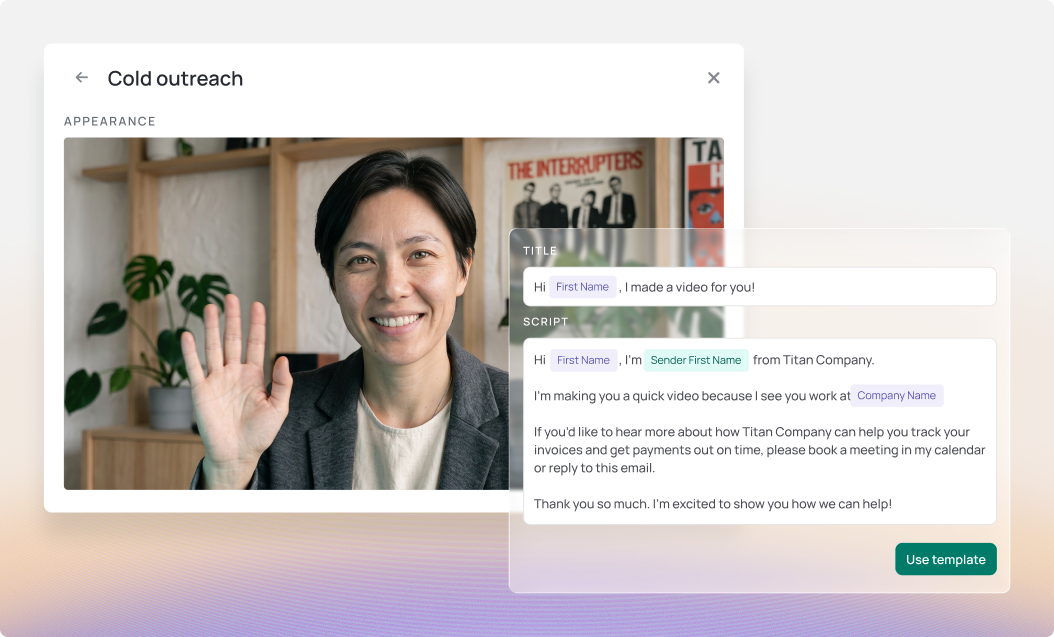
Vidyard’s Video Agent enables teams to automatically generate and send AI Avatar videos based on actions prospects take in the sales process. With Zapier, now they can trigger these videos by events that happen in over 8,000 other apps including Webflow, Chili Piper, Calendly, Salesforce, and beyond.
Vidyard also offers pre-built, actionable workflows for Salesloft, Chili Piper, and Mailchimp, making it easy for teams to launch video automations in seconds without any setup.
Some key triggers to send prospects an automated, personalized video:
- New meeting books
- Trigger a personalized Video Agent campaign video when a meeting is booked in Chili Piper or Calendly
- Demo request form submitted
- After a user fills out a WordPress or Webflow form, Video Agent sends a personalized video introducing the AE
- Cold outreach
- When a new lead is added to an AE’s workflow, automatically create a video they can send in their first cold email
- Post-event follow-up
- After a webinar, send a personalized video recapping the conversation and link to additional educational content to keep the momentum going.
- High-intent video engagement
- When a known viewer watches one of your videos, trigger real-time follow-up actions such as notifying a Slack channel, updating contact notes in ActiveCampaign, or tracking the view in Mailchimp, helping reps engage at exactly the right moment.
By automating personalized videos at every stage of the buyer journey and responding instantly when prospects engage, teams can reduce no-shows, increase reply rates, accelerate deal momentum, and maintain consistent follow-up without adding manual rep effort.
Check out our pre-built Zapier integrations to get started with Video Agent + Zapier.

CRM integrations (HubSpot, Salesforce, Pipedrive)
Wouldn’t it be nice if your customer relationship management (CRM) tool automatically updated leads and contacts with new information? Good news: There’s a Zap for that. (In fact, there are several.)
Here are some recommendations for ways to make the most of CRM automation with Zapier.
Create Salesforce leads from form submissions and emails
When a prospect clicks an ad, fills out a form, or sends an email, you can automatically convert that information into new leads in your CRM. It’s easy, and it sure beats manual data entry.
Best Zaps for Salesforce:
- Add new Google Ads leads to Salesforce
- Create Salesforce leads with new Gravity Forms submissions
- Add new Salesforce contacts to Mailchimp
Route leads to the right person
Easily set up lead routing rules based on territories, company size, or industry to ensure every rep gets the right prospects.
Zapier has its own Lead Router tool or you can look to build your own.
Best Zaps for lead routing:
- Route Leads from Typeform to Salesforce
- Round robin lead assignment
- Connect Facebook Lead Ads and Zapier Lead Router
Automate deal stage changes
Sophisticated sales teams have clear steps prospects must complete to move to the next deal stage. Rather than having to manually drag deals over to that next stage, this can easily be automated with Zapier.
Best Zaps for deal stage updates:
- Update deal stage in Pipedrive, and notify team member via Outlook email
- Update deal status in Pipedrive based on webhook data and defined criteria
- Update deal status in Pipedrive when deal stage changes
Scheduling tool integrations (Calendly, Chili Piper, HubSpot Meetings)
Yes, we know that these tools add the invite to your team’s calendar… but where else should that data go and how else can your team surprise and delight prospects in these moments?
Best Zaps to use with scheduling tools:
- Send personalized video with Video Agent after meeting booked through Chili Piper
- Send Slack messages for new Calendly invites
- Manage meeting activities based on bookings
Best Zapier integrations for team communication
Many teams today are remote-first or have team members around the world. This can lead to information silos and misunderstandings if teams don’t have easy, automated access to the same information.
These Zaps will keep everyone on the same page without extra effort.
Slack
Each team might use Slack slightly differently, but there are way more ways to connect tools to trigger alerts to individuals, teams, and leadership.
Best Zaps for Slack:
- Share Google Forms responses in a Slack channel
- Send Slack channel messages for newly abandoned carts in Shopify
- Send approaching Google Calendar events to a Slack channel
Microsoft Teams
Similar to Slack, Microsoft team can be customized to company-wide, teams, and individual needs.
Best Microsoft Team Zaps:
- Send messages to Microsoft Teams channels for new Typeform entries
- Notify a Microsoft Teams channel for new Zap errors
- Send daily reminders in Microsoft Teams
Best Zapier integrations for video and content
Here are a few Zapier video automation ideas to help smooth out your video workflow beyond automating video creation, including video content management, team notification, and viewer behavior analysis.
Vidyard (video management and analytics)
If you’re producing lots of excellent video content, but your upload processes mean that those videos are scattered across the cloud, you can simplify video content management with the Vidyard library so they’re in one centralized, easy-to-access place.
Best Zaps for Importing Videos from Cloud Storage:
What’s the good of new videos when nobody knows they exist? Better manage your videos by ensuring everyone gets a Slack notification when a new video hits your Vidyard library.
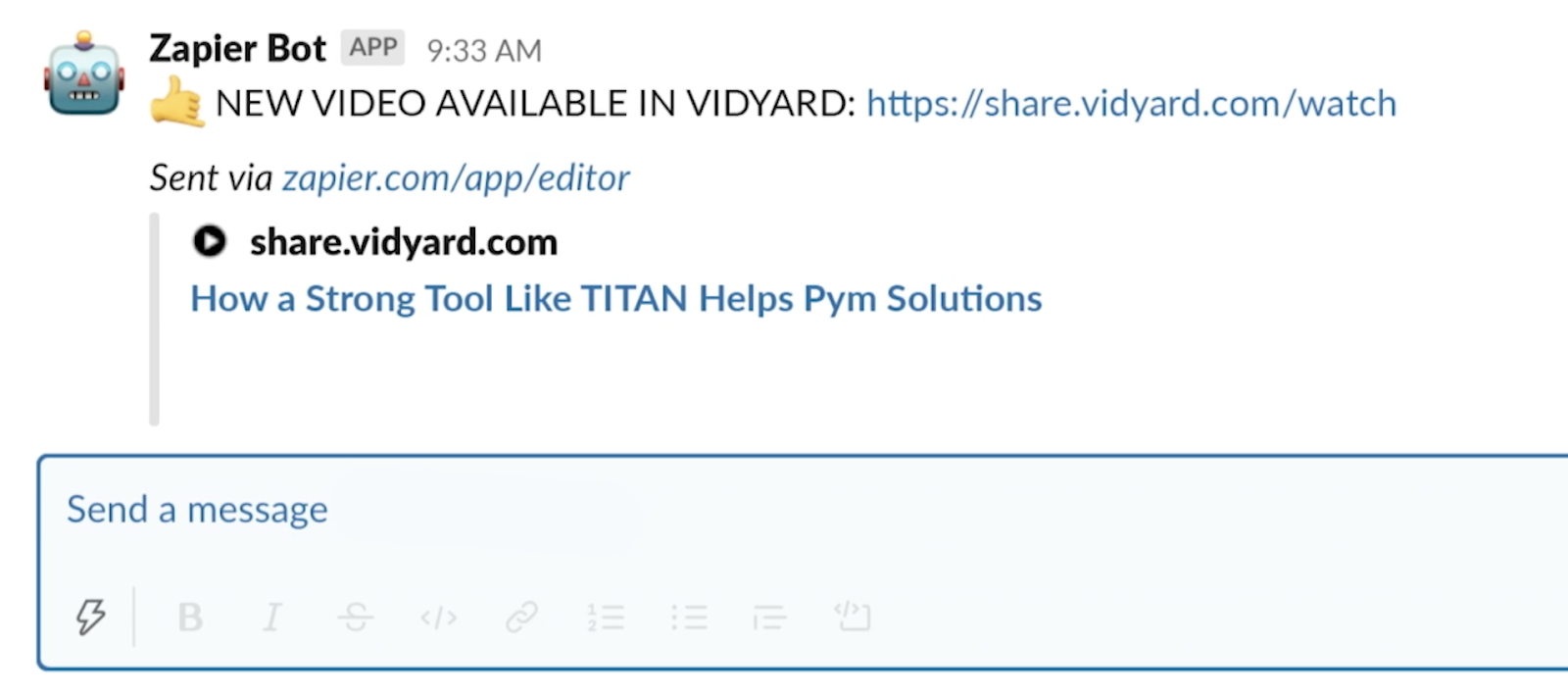
What good are great videos if nobody sees them? Automatically post your new videos to your LinkedIn, Facebook, TikTok, and Hootsuite connected accounts so you’ll always have the freshest content on social.
Best Zaps for Posting Video to Social Media:
- Post new Vidyard videos to Facebook
- Post new Vidyard videos to Twitter
- Post new Vidyard videos to LinkedIn
- Schedule new Vidyard videos to be published via Hootsuite
YouTube and Vimeo
Wherever you host your public video content, you can make sure that it’s being utilized by all teams in the best ways.
Best Youtube Zaps:
Best Vimeo Zaps:
Best Zapier integrations for project management
Whether your team uses Trello, Asana, Monday, Notion or other project management tools, Zapier makes it easier to help teams stay on track.
Trello
Trello is already a pretty intuitive platform, but there are a few Zaps for Trello automation that make it even more effective (and your workday even more efficient).
Best Trello Zaps:
- Create Trello cards for new Microsoft Office 365 events
- Create new Trello cards from new Google Calendar events
- Create Trello cards from new saved Slack messages
Asana
Asana is a well known project management tool used across teams including marketing, engineering, design, and operations.
Best Asana Zaps:
- Create Asana tasks every week at a scheduled time
- Create Asana tasks from new saved Slack messages
- Add new Asana tasks to Google Sheets rows
Monday
Monday is known for its flexibility and integrations, and Zapier takes both these to the next level.
Best Monday Zaps:
- Create items on a monday.com board for new rows on Google Sheets
- Create items in monday.com when new Wix forms are submitted
Best Zapier integrations for email and documents
Emails are one of the original sources of busy work, which is why so many tools have sprung up to automate the email-sending process. In the digital age, collaboration often starts in shared online docs, which can get lost in the shuffle if you’re not careful.
You can take the efficiency of email automation and document sharing to the next level by throwing Zapier into the mix.
Gmail and Outlook
Have a lot of email accounts you need to track? Or maybe you need to give your whole team visibility into a single inbox? Set up automatic notifications when you receive new emails so you’re always on top of customer questions and requests.
Best Zaps for Gmail:
- Get email notifications or send follow-ups to new Typeform respondents
- Send emails via Gmail for new Google Ads leads
- Send daily emails with Gmail
Best Zaps for Outlook:
- Create tasks in Microsoft To-Do from new Microsoft Outlook emails
- Create email copy with ChatGPT from new Microsoft Outlook emails and save as drafts
Best Zapier integrations for AI and automation
Whether it’s a new AI tool you’ve just implemented or you’re looking for innovative ways to connect ChatGPT to other tools in your stack, we’ve got you covered.
ChatGPT and AI assistants
Rather than having to open a new ChatGPT or Claude window, you can have these tools automatically generate responses your team can review.
- Create email copy with ChatGPT from new Gmail emails and save as drafts in Gmail
- Get an AI-generated daily digest of your emails in Slack
- Generate an AI-analysis of Google Form responses and store in Google Sheets with Claude
Webhooks and custom integrations
For advanced users, webhooks let you connect apps that don’t have built-in Zapier integrations. They work by sending simple web requests to trigger actions or share data between systems. Webhooks are powerful and flexible, but require some technical setup.
Webhooks by Zapier is a great place to get started for these more technical use cases.
How to choose the right Zapier integrations for your team
First, start by identifying high-impact, repeatable tasks that consume time or introduce errors like manual data entry, meeting follow-ups, or status updates between tools. Focus on workflows that touch multiple systems or teams, since these are often the biggest automation wins and deliver fast ROI when streamlined.
But, rather than trying to automate everything at once, begin with a single, well-defined workflow and expand from there. For example, automating Video Agent meeting confirmations, triggered by a calendar booking and followed by CRM updates and Slack notifications, can quickly demonstrate value and build confidence. Once that workflow is stable, you can layer on additional steps or replicate the pattern across other use cases.
Finally, Zapier’s no-code approach means RevOps, enablement, and operations teams can create and manage integrations on their own, without engineering support. This enables faster iteration, easier experimentation with new automations, and ongoing process improvements as team needs change. Let them experiment and share the results with other team members!
Zapier integrations make work easier
Zapier integrations boost productivity and sales efficiency by eliminating manual work, keeping tools in sync, and ensuring personalized follow-ups can scale. By connecting everyday apps into seamless workflows, teams spend less time on admin tasks and more time engaging prospects and closing deals.
Video Agent + Zapier enables teams to establish and build relationships through the power of personalized video. Together, they make it easy to trigger custom videos from CRM events, meetings, or form fills ultimately helping reps deliver timely, personal outreach at scale without adding extra effort.
Frequently asked questions
How much does Zapier cost?
Zapier offers a free plan with basic automation and up to 100 tasks per month, and paid plans typically start around $19.99/month (billed annually) for more tasks and advanced features with team plans starting at $69.99/month.
What are the most popular Zapier integrations?
Many of the most popular Zapier integrations link everyday tools such as Google Sheets, Slack, Salesforce, Gmail, and HubSpot to automate communication, data updates, and task management.
Today, they can help teams connect over 9,000 different tools.
Can I use Zapier without coding skills?
Yes, Zapier is a no-code platform designed for non-technical users. You can build automations using simple, step-by-step workflows, pre-built templates, or their AI Copilot.
How do I connect Vidyard to Zapier?
You can connect Vidyard to Zapier by selecting Vidyard as a trigger or action app inside Zapier and signing in to authorize your account.
What’s the difference between Zapier and native integrations?
Native integrations are built directly into a product and typically offer deeper, more seamless functionality with minimal setup. Zapier acts as a flexible middle layer, allowing you to connect thousands of apps, even if they don’t have a native integration.
While native integrations are often more robust for specific use cases, Zapier excels at quick setup, customization, and connecting tools across your entire stack.
This post was originally published on October 4, 2018. It was updated on January 1, 2026.