Prospecting and Intros
Stand out and improve response rates.
 Sales
SalesGenerate more pipeline and close more deals.
 Sales Support
Set your sales team up for success.
 Marketing
Host video content and convert viewers into leads.
 Converting and Closing
Connect with buyers and close more deals.
 Corporate Comms
Create and deliver an internal communications strategy.
See Vidyard in Action →
“Personalized Vidyard video messages drove an 8x improvement in click-through rates and a 4x improvement in reply rates.” Read More
 Blog
BlogThe secrets to virtual selling and video best practices.
 Video Agent Hub
Case studies and how-to videos for every revenue use case.
 Knowledge Base
How-to and help articles for all things Vidyard.
 Fast Forward
Expert advice on all things virtual selling.
 Templates
Free sales templates for every stage of the deal cycle.
 FAQ
FAQGet the answers to your top Vidyard questions.
 AI Resource Hub
Guides and ideas for using AI in your workflow.
 Case Studies
Learn how our customers win more with Vidyard.








How to Use Each LinkedIn Video Format
May 28, 2021
·
13 min read

Chris Gillespie

LinkedIn users watch 300 million videos per year and counting. Learn everything you need to know to generate traffic and conversions from LinkedIn videos.
After a long history of prioritizing the written word, the world’s largest professional networking site LinkedIn is now a prime place to post your marketing videos.
LinkedIn’s pivot to video came late, but its conversion has been total. It loves video. There’s some evidence that it gives video posts priority over other posts in the feed and some of the advantages—like auto playing them, which helps capture more attention.
“Video is the fastest growing format on our platform right now, and the one most likely to get people talking,” Pete Davies, director of product management at LinkedIn, told TechCrunch.
On LinkedIn, where comments are the holy grail of social currency, things that get people talking are things that spread. Any marketer already on LinkedIn looking for an advantage beyond paying to promote posts needs to look no further than video.
And it’s not just marketers realizing the benefits of the platform. For any sales rep, LinkedIn is increasingly becoming an essential virtual selling tool. Not only can you network virtually, but you can also search for new prospects and join peer-to-peer conversations. . Now you can elevate those connections even further with the ability to create and send video on LinkedIn in a direct message. No more searching on LinkedIn and then hopping over to email to be able to send a personalized video, now it can all be done on one platform with the Vidyard Chrome Extension.
Table of Contents
Benefits of LinkedIn Video
LinkedIn users view 300 million videos per year. Video posts get 3x more engagement than posts with only text or images and a video post on LinkedIn is 5x more likely to start a conversation.
It’s little surprise that 51% of marketers on LinkedIn use video.
- 92% of B2B marketers use LinkedIn (Omnicore)
- 90 million LinkedIn users are senior-level influencers (LinkedIn)
- LinkedIn Ads can be 227% more effective than other social networks (SocialPilot)
- LinkedIn users log in for an average of 24 minutes per workday (Statista)
These effects compound. Brands that post helpful or informative videos on LinkedIn train viewers to expect videos—and earn more presence in the LinkedIn feed.
Sign up for a free account to record and share videos on your LinkedIn page and through direct message.
Linked Videos and Direct Message Videos on LinkedIn
The companies that benefit most from posting video on LinkedIn are those with inspirational or educational stories. But unlike ‘something-for-everyone’ social media sites like Facebook or YouTube, LinkedIn has a clear purpose: To connect professionals. That means the majority of conversations on the site revolve around careers, companies, products, and advice.
You’ll see lots of people posting jobs, announcing funding rounds, asking for tech stack input, and trumpeting their software. But the stories that tend to perform the best are those that connect back to a higher purpose or offer genuine value.
Squarespace posts ultra high-production value videos, like this one featuring customers, on their LinkedIn.
There are three primary ways of using video on LinkedIn:
- Upload Natively: Upload a video file to LinkedIn or record a video with the LinkedIn app
- Upload and/or Create a Video: Upload or create a video in a direct message from within LinkedIn using the Vidyard browser extension
- Post a Link: Paste a video link into a LinkedIn post or direct message
There’s a big tradeoff here: Like all major social media sites, LinkedIn gives a slight preference to videos that are uploaded directly. It has an interest in keeping users within the platform. But its built-in analytics leave marketers wanting.
It’s only by posting a video link from a video platform that marketers gain visibility into more than just views, reactions, and shares. Only a video platform shows contact and company-level analytics and allows marketers to score leads based on their viewer behavior.
How to Post a Video on LinkedIn Using a Link (Desktop or Mobile)
- Navigate to your LinkedIn feed
- Click Start a post
- Paste the link (can be to wherever your video is hosted)
- Write your post
- Add hashtags and @ mention people
- To publish, click Post

Vidyard Hosting makes it easy to leverage the power of video across your business.
Direct Video Message Using Vidyard Chrome Extension
When it comes to virtual selling, you couldn’t get a better combo than personal video and LinkedIn.
If you use a tool like the Vidyard Chrome extension, it’s easy to record and send a video right within the LinkedIn direct message composer. You can also share videos from your Vidyard library on your personal LinkedIn feed, in a direct message, or to a company page.
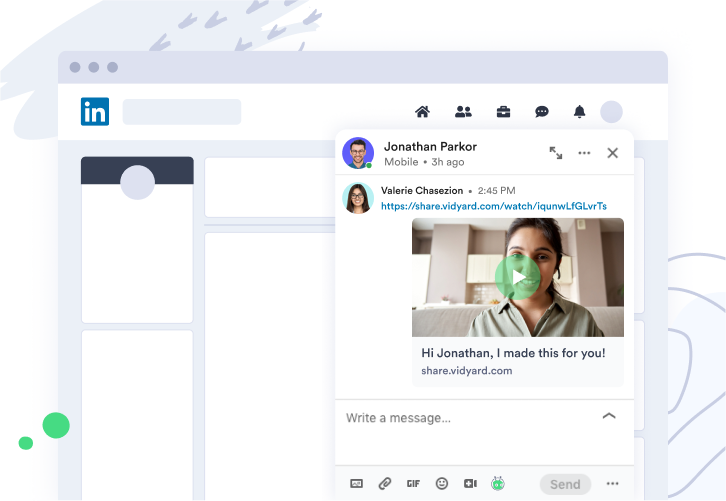
Key benefits of using direct video message on LinkedIn include:
- Adding a video increases the chance that your recipient will open the message and hear what you have to say.
- If an interested buyer reaches out to you, you can start building a personal relationship right away with a friendly video reply.
- No more getting lost in an email inbox with a quick video replay right in a direct message.
How to Send a Direct Video Message Using Vidyard Chrome or Edge Extension
- Install the Vidyard Chrome or Edge extension
- Open the Compose Message window in LinkedIn and you should see the Vidyard logo at the bottom of the message window.
- If you do not see the Vidyard logo, click on the Vidyard Chrome extension logo in your Chrome browser, go into Settings and hit Reload
- Once the Vidyard logo is showing in the LinkedIn message window, you can click on the logo to start recording a video as usual or upload an existing video from your library
In this video, Tyler Lessard, Vidyard’s Chief VIdeo Strategist, shows how to send a direct video message on LinkedIn.

LinkedIn Native Videos (a.k.a. In-Feed Videos)
The great majority of videos shared on LinkedIn are native videos, either uploaded directly or recorded through the LinkedIn app.
Once published, native videos appear in the LinkedIn feed. Based on how viewers comment and, to a lesser extent, whether they like and share, it’ll be distributed over several days.
Jack Taubl, an account executive at Forrester, recorded a song about year-end sales woes.
LinkedIn Native Video Ideas
- Ask for Advice: Everyone loves to be asked for their expertise. This encourages engagement and commenting, which the LinkedIn algorithm likes.
- Post Company News: What might be considered bragging on other sites is fair game on LinkedIn. People are interested in who you’ve hired, who you’ve acquired, and what events you plan to attend—no caveat needed.
- Talk About Your Solution: The focus should be on the problem your product solves, not just your product itself. Simply posting facts or pictures without context isn’t as engaging as talking about a challenge overcome.
- Discuss Your Vision: Inspire others by talking about a mission that’s larger than your company.
- Share Customer Stories: Help others learn by talking about issues you helped your customers overcome. Do it in a way they’ll find flattering and ask their permission first.
- Share Interviews: Host a Q&A with an executive or someone you connected with at a conference.
Vidyard uses video clips, motion graphics, animated text, and more to promote our free video tool.
Specs for LinkedIn Native Video
LinkedIn native videos can be as short as three seconds and as long as 10 minutes. LinkedIn’s video player is just short of widescreen format and vertical videos will be either cropped into a square or displayed with pillar boxing.
Video File Requirements:
- Max file size: 5GB
- Minimum file size: 75KB
- Max video duration: 10 minutes
- Minimum video duration: 3 seconds
- Resolution range: 256×144 to 4096×2304
- Aspect ratio: 1:2.4 – 2.4:1
- Frame rates: 10fps – 60 fps
- Bit rates: 192 kbps – 30 Mbps

Every different social platform has its own requirements for videos. Every single one is in this guide.
Social Video Specs Guide
Best Practices for LinkedIn Native Video
The number one best practice for LinkedIn video applies to all LinkedIn posts: Tell a story. The great majority of posts on LinkedIn are simply a link to a press release or article. Without context, people are unlikely to click. Always write a short story or explanation with a hook.
Keep it professional: With some exceptions, videos on LinkedIn should be related to work, career, business, economics, finance, or a particular industry. LinkedIn users actively uphold this unspoken etiquette and will often comment or “shout down” posts considered unprofessional, like math problems or logic puzzles that are clearly repurposed from non-work sites like Facebook.
When posting a link, use LinkedIn’s suggested thumbnail: When you paste a video link into a post draft, LinkedIn will automatically pull its metadata to produce a clickable card that includes the name, description, and thumbnail. You have the option to replace this with an image of your choosing, but don’t: The card is clickable and will take viewers to your video whereas an image will simply open an image lightbox and leave viewers wondering why the video won’t play.
Use hashtags: Tag any companies or people mentioned in your post. They’ll be notified and it’ll be shown to their networks. Also use hashtags (simply type “#” and start typing to see a list of predictive options) which are how LinkedIn categorizes which posts are shown where. If your “#contentmarketing” post receives lots of comments it can “trend” and be shown to people who follow that hashtag but aren’t in your network.
Assume people will watch on silent: LinkedIn users at work or on the mobile app usually have the sound off. (The sound is always off by default.) Add captions and animations so that the video still makes sense on silent—though you can and should still include sound for those who enable it.
Front-load information: Whatever you have to say, say it in the first one to two seconds of your video, says LinkedIn. Busy people scrolling through their feeds are scanning for snippets of “insight” and burying your logo or the message near the end means it’ll often go unseen.
Humble brag away: What’s unacceptable on other sites is often fair game on LinkedIn: People want to know your news. Posting about getting hired, getting fired, starting a company, raising money, or any big corporate news is celebrated.
Don’t bash others: While complaint posts may get likes, they’re a bad look for your brand. In the heat of the moment, professionals sometimes post videos where they complain about rude salespeople, and perhaps even @ mention the salesperson’s boss. These firestorms rarely end well for them. Bashing junior sales development reps for a slip-up isn’t a good look. Keep your news positive.
Repurpose your content: Though LinkedIn wouldn’t phrase it this way, the site is a great place to repurpose your existing video content. Repost highlight reels from events, interviews, or webinars and drive viewers back to the full thing.
Use what you have: Higher production videos will often increase your watchability but remember that your message and content are the most important thing. A great way to enhance the visibility of your video is to pick an eye-catching video thumbnail. If you don’t have a big production budget then use the equipment you have(i.e. smartphone).
Allen Gannett, CSO at Skyword, posts interviews with other executives on LinkedIn.
How to Share Native Videos on LinkedIn
To share videos on LinkedIn, either drop a link into a post draft or share them natively. Upload a video file from the desktop site or record a video from the mobile app.
How to Upload a Video to LinkedIn on the Desktop Site
- Record a video using an app such as iMovie or Quicktime
- Save the file to your desktop
- From your feed, click the video icon next to the text “Start a post”
- You’ll be prompted to upload the video
- Add hashtags and @ mention people
- To publish, click Post
How to Record and Share a LinkedIn Video from Mobile
- From your feed, click the video icon
- You may be directed to enable your camera and microphone
- Return to the app
- Click the video icon again
- Click the red video icon to begin recording
- (Optional) Add stickers with the sticker icon near the upper right of the screen
- To post, press the blue arrow icon
Native LinkedIn Video Metrics
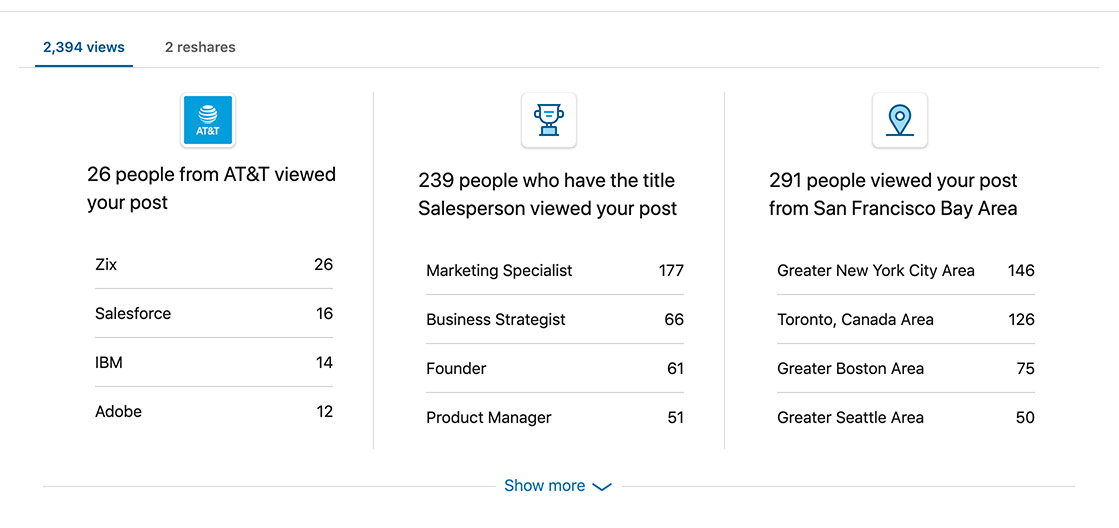
LinkedIn video metrics are somewhat limited. The closest you come to real insight is being able to see the top companies, titles, and locations of viewers, though it’s just an aggregate count. This can tell you where your video was popular, what types of titles it’s popular with, and within which companies.
- Total views
- Total likes
- Total reshares
- Total comments
- Top companies, titles, and locations of viewers (data is anonymized)
LinkedIn Live Videos
In February 2019, LinkedIn launched LinkedIn Live, a tool for allowing thought leaders and top influencers (an actual designation on LinkedIn) to broadcast events, updates, earnings calls, and training to their followers.
Live video offers rather generous benefits, according to LinkedIn. Aside from being exciting and attention-grabbing simply because it’s novel, live videos earn 24x more comments and 7x more reactions than native videos.
It’s still in closed beta and not available to general LinkedIn users, though anyone can apply to be a broadcaster through LinkedIn’s application.
Rebecca, Content Strategy Manager at Vidyard, uses LinkedIn Live for a bi-weekly interview video series Behind The Scenes. Each episode is streamed on LinkedIn Live and then uploaded to the Vidyard channel on Youtube for on-demand viewing.

LinkedIn Live Video Ideas
LinkedIn offers a long list of ideas for live videos, for those who can create them:
- Host interviews and Q&As
- Interview an influencer to learn about their day-in-the-life
- Run a monthly book club
- Stream a keynote or panel
- Go behind the scenes at an event
- Unveil a new product
- Take viewers on an office tour
- Congratulate individuals on big promotions
- Deliver a speech
- Live presentations
- Fireside chats
Specs for LinkedIn Live Videos
To post LinkedIn Live videos, you’ll need a third-party broadcaster tool such as Streamyard, Socialive, Switcher Studio, or Restream.
Every different social platform has its own requirements for videos. Every single one is in this guide.
Social Video Specs Guide
Best Practices for LinkedIn Live Videos
Aim for interactivity: The most successful LinkedIn Live videos involve some level of interactivity. For instance, the wellness company Thrive Global hosts an “Ask me anything,” or AMA, where viewers can comment to ask questions of its founder, Arianna Hufington. This gets people commenting and sharing which increases their reach.
Use exclusivity: In promoting the livestream, promise to show or share something viewers can’t see elsewhere, like the unveiling of a new product or brand.
Be consistent: Train viewers to expect livestreams by hosting them at consistent times on consistent dates.
Be authentic: Prepare heavily but avoid scripts. Part of the allure of “live” is seeing something that hasn’t been heavily produced and doesn’t feel overly sanitized.
GroupM’s chief product officer releases a weekly livestream for product updates
LinkedIn Live Video Metrics
Linked provides a few different measures for LinkedIn Live videos. Note: They count a LinkedIn Live video as being viewed after three seconds of watch time.
- Peak number of concurrent viewers while the video was live
- Total minutes watched
- Total number of views
- Viewers for both live and replay versions
- Number of reactions, comments, and shares
- Top Pages, titles, and location watched from
LinkedIn suggests paying attention to peak concurrent live viewers and total viewers to understand brand awareness, looking at peak concurrent live viewers and total live engagement to understand real-time engagement, and getting insight from total live engagements and total engagements to understand overall engagement.
Pro Tip: Take a screenshot of your engagement stats as soon as the LinkedIn Live stream has ended so that you can easily compare your live and replay metrics.
Hootsuite streamed a discussion with a few members of their development team to give potential candidates an inside look at what working on the team looks like.
LinkedIn Video Ads
Long before LinkedIn allowed users to easily post native videos, it allowed video ads. Unlike native ads, LinkedIn video ads can run for up to 30 minutes and get 30% more comments than non-video ads.
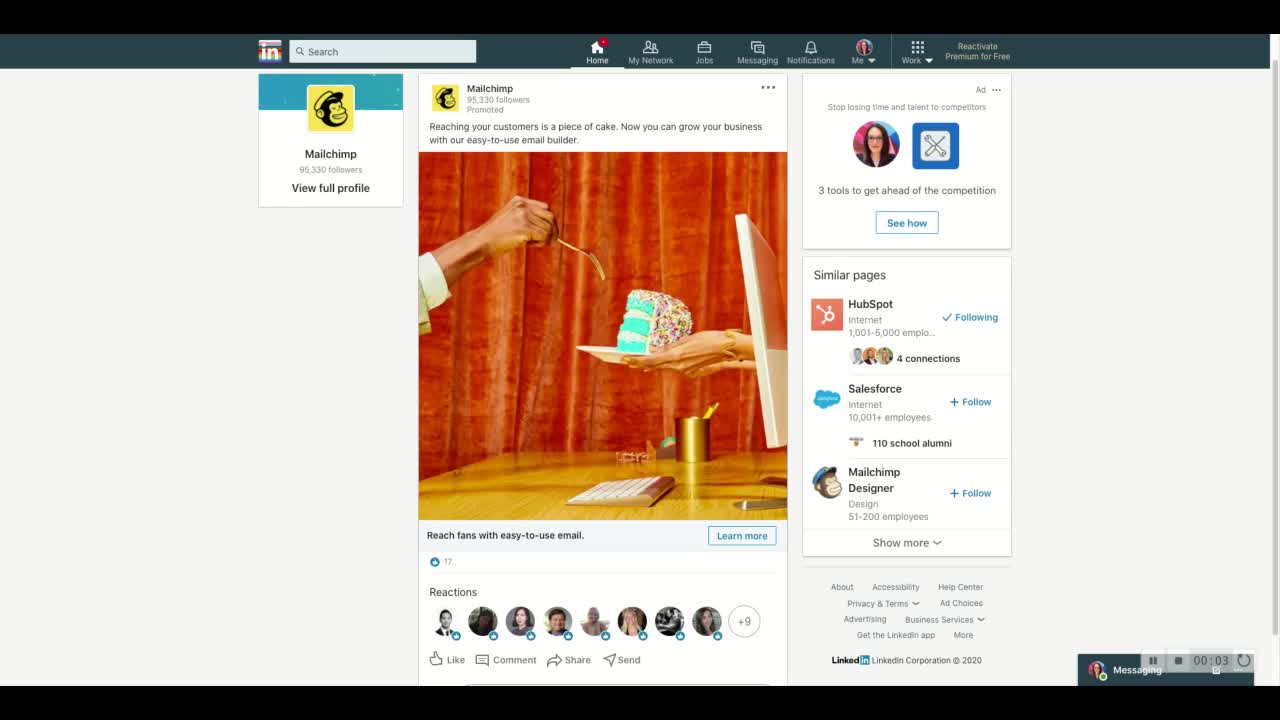
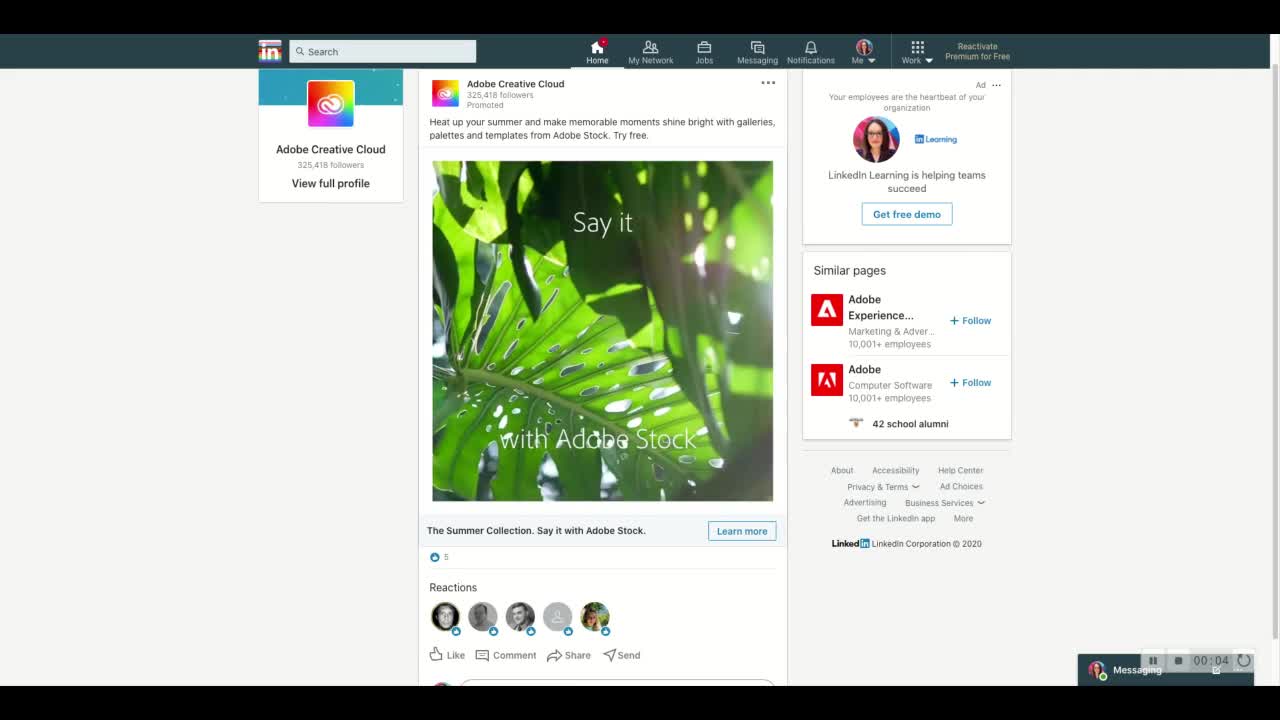
The only type of video ad LinkedIn currently offers is the Native Video Ad, which shows up in viewers’ feeds as a post with the designation “Promoted.” Unlike native video posts, LinkedIn video ads auto-play, on silent.
MailChimp used semi-surreal repeating clips to promote its product through LinkedIn video ads, like this one with cake coming out of a computer screen.
Best Practices for LinkedIn Video Ads
Choose a goal: LinkedIn’s ads optimize for clicks or view time depending on what you select. If you’re optimizing for a goal like downloads or purchases, use LinkedIn’s tracking pixel.
Front-load the main message: LinkedIn’s marketing team says you have one to two seconds to capture viewers’ attention. Place your branding and message upfront to make sure they aren’t buried.
LinkedIn Video Ad Metrics
When it comes to video ad campaigns, LinkedIn provides some more nuanced measures.
- Plays: The number of times a video starts to play
- Views: Two or more continuous seconds of playback while the video is at least 50% on screen or a click on the CTA (whichever comes first)
- View Rate: Number of views/impressions, multiplied by 100
- eCPV: Estimated Cost Per View (some of the views are free, resulting from LinkedIn users share the ad, giving it organic reach)
- Views at 25%: Number of times the video was watched at 25% of its length (including watches that skipped to this point)
- Views at 50%: Number of times the video was watched at 50% of its length (including watches that skipped to this point)
- Views at 75%: Number of times the video was watched at 75% of its length (including watches that skipped to this point)
- Completions: Number of times the video was watched at 97 to 100% of its length (including watches that skipped to this point)
- Completion Rate: Completions divided by views as a percentage
- Full Screen Plays: Total number of clicks to view video in full screen mode
Adobe advertised their summertime collection of stock assets using a montage of summery clips in LinkedIn video ad.
Video in LinkedIn Articles
LinkedIn has a feature for publishing complete articles, not just posts. Formerly called LinkedIn Pulse, it’s gone through several iterations. After a spike in individuals simply reposting articles from elsewhere, LinkedIn hid the feature and made changes to encourage original content only.
Now it’s making a comeback—at the bottom of the “Share a Post” button is the text “Write an article on LinkedIn.” These articles are an underused and underrated opportunity to share video on LinkedIn.
Best Practices for Video in LinkedIn Articles
Add videos to LinkedIn Articles just as you would any other blog post. You can either post one full video—a webinar, an explainer, or an interview, for instance—or intersperse several videos throughout.
If the video is the focus of the article, use a header image that, like a thumbnail, teases the idea that there’s video inside. Use “Video” in the title, and place your video after a brief introduction.
If you’re supporting your point using video or embedding video examples, write your article as you would typically, adding the videos where relevant throughout.
Use a clickable thumbnail: LinkedIn Articles pulls in whatever thumbnail your video has set. Ensure that the one it shows makes viewers curious and want to click.
Set the thumbnail as the header image too: Once the article is published, the header image becomes the thumbnail in the feed and on your profile. If it looks like a video, complete with a play button, it’ll earn more clicks.
How to Share LinkedIn Videos in Articles
Every LinkedIn article gets its own unique URL which you can share anywhere you’d otherwise share videos. Once you hit “Publish” on your article, it goes live and will be featured in your network feed just like any other post.
How to Share LinkedIn Videos in Articles
- From the LinkedIn feed, near the top, click Write an article on LinkedIn (alternatively, log into LinkedIn and type in the URL LinkedIn.com/post/new)
- Within the body of the article, click the box with a plus icon on the left
- Click Video
- Enter the link of the video and press enter
- When you’re finished with the article, click Publish in the upper right
Bonus: Add Video to LinkedIn Profiles
Like email signatures, LinkedIn’s personal and company profiles are a great place to post links to videos for extra views and traffic. If you get everyone in your company doing it, it can really expand your reach.
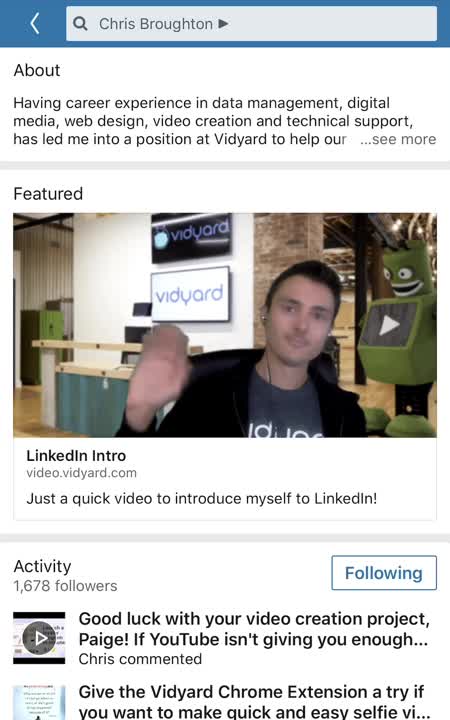
Vidyard Technical Account Manager Chris Broughton made his LinkedIn profile friendlier and more inviting with an intro video. The GIF thumbnail helps capture attention and encourage profile visitors to click to watch the video.
How to Embed Videos into LinkedIn Profiles
- You can add video links to the Experience section of your public profile, right below your current company.
- When signed in, navigate to the edit icon next to the company which will bring up a dialog box
- Scroll down to Media and click Link
- Add the video Link and save
- When you return to your profile, you should see a clickable video card with title and thumbnail beneath the company
How to Embed Videos into Company Pages
- Create a post with a video on your Company Page and then pin it to the top.
- When signed in as an admin, click Start a post
- Publish the post with a video
- Once posted, click the menu icon on the post
- Select Pin to top
LinkedIn Profile Video Metrics
LinkedIn doesn’t provide metrics for profile videos but if you’re using a video platform like Vidyard, you’ll get detailed view metrics.
Getting Started with Video on LinkedIn
The best way to get started posting videos on LinkedIn is by repurposing your existing content as native videos or send a video in a direct message. There’s no limit to what you can post to LinkedIn via a link and if you post with a link from a video platform like Vidyard, you’ll get the full analytics on who’s watched, how much, and all the intent data that comes with it.
It’s been a long time coming, but LinkedIn is finally a welcome home for your sales and marketing videos. They can help your posts earn 3x more comments and 7x more conversations and with a variety of video options including ads, your LinkedIn videos can become an integral part of your video program.
Vidyard Hosting makes it easy to leverage the power of video across your business.
This post was originally published on June 24, 2020. It was updated on May 28, 2021.