Prospecting and Intros
Stand out and improve response rates.
 Sales
SalesGenerate more pipeline and close more deals.
 Sales Support
Set your sales team up for success.
 Marketing
Host video content and convert viewers into leads.
 Converting and Closing
Connect with buyers and close more deals.
 Corporate Comms
Create and deliver an internal communications strategy.
See Vidyard in Action →
“Personalized Vidyard video messages drove an 8x improvement in click-through rates and a 4x improvement in reply rates.” Read More
 Blog
BlogThe secrets to virtual selling and video best practices.
 Video Agent Hub
Case studies and how-to videos for every revenue use case.
 Knowledge Base
How-to and help articles for all things Vidyard.
 Fast Forward
Expert advice on all things virtual selling.
 Templates
Free sales templates for every stage of the deal cycle.
 FAQ
FAQGet the answers to your top Vidyard questions.
 AI Resource Hub
Guides and ideas for using AI in your workflow.
 Case Studies
Learn how our customers win more with Vidyard.








How to Create the Best ‘How-To Videos’
Dec 17, 2019
·
9 min read

Jillian S. Wood
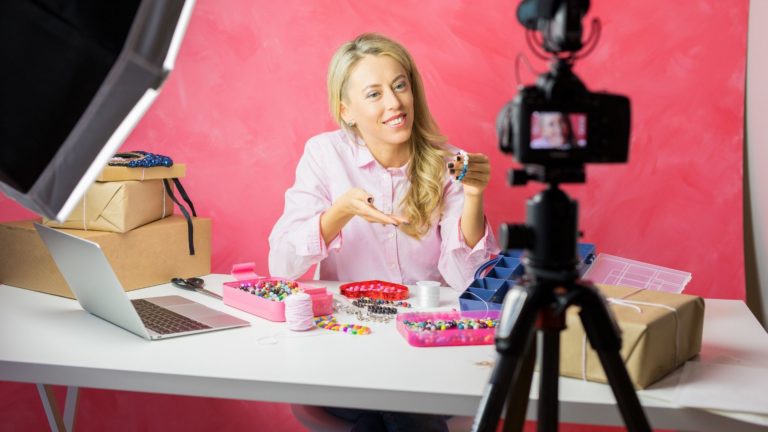
Learn how to make tutorial videos that engage and educate audiences. Plus, find out how valuable how to videos can be for your business and see examples of effective ones.
Ever type “how to <fill in the blank>” into Google and noticed the number of video tutorials that appear on the results page?
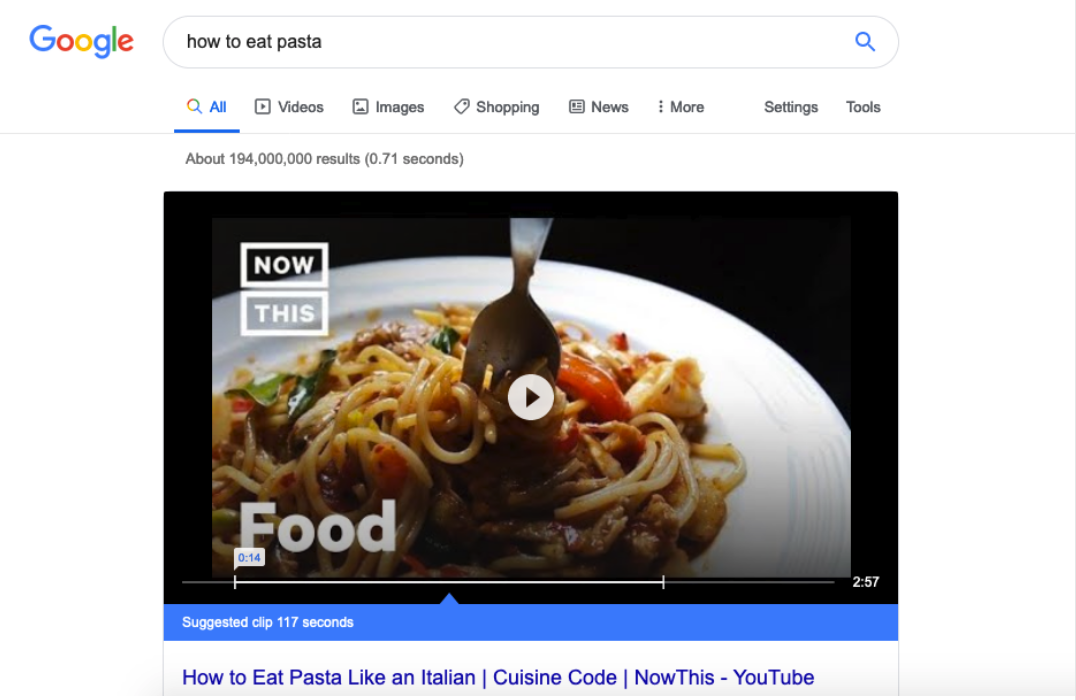
Those videos are more than just search engine window dressing. Businesses are leveraging how-to videos to grow their brand and earn more customers.
What’s causing this trend? The rising popularity of this type of video, along with websites like YouTube and Vimeo, is part of it.
If you’re wondering how to create effective instructional videos—and how to capitalize on them for sales and marketing purposes—you’ve come to the right place. Below, we’ve written an extensive guide to creating the best how-to videos.
Mat King, Vidyard’s Video Production Manager, delves into the essential things you need to know about how to videos: What they are and how to create one that teaches your audience what they want to learn. Along with Vidyard’s Creative Director, Blake Smith, Mat also breaks down a real tutorial video to examine what makes it work.
Table of Contents
What is a Tutorial Video?
A how-to video shows viewers the steps needed to complete a task in a logical order. It uses visuals and/or audio instructions to communicate the process clearly and concisely.
Video tutorials can illustrate simple actions (like how to fold a sheet), or abstract processes (like launching an online business).
Here’s an example from Kraft Foods’ official YouTube channel:
What’s the Difference Between How-To, Explainer, and Demo Videos?
Businesses usually create video tutorials that are relevant to their industry or product category. How-to videos are similar to explainer videos or demo videos, but they are more instructional and less promotional than explainers or demos (which illustrate exactly how a brand’s products or services work).
| How-To Video | Explainer Video | Demo Video | |
|---|---|---|---|
| Purpose | Explains how to do something; Often based on popular search queries; May not feature a product or service. | Explains why a product or service exists and, at a high-level, how it works, why it is valuable, etc. | Explains the nuts and bolts of how a product works in a real-life scenario or setting; May show off multiple features. |
| Length | Can vary depending on the topics; Often short. | Not usually more than a few minutes; Should be short. | Varies depending on the complexity of the product. |
| Distribution | Shared widely on social channels, blogs, etc. May be embedded into not-so-prominent places on the company’s website. | Usually lives on a company’s main website and product pages. Can be shared on social media channels sparingly. | Usually lives on a company’s main website and product pages. Can be shared on social media channels sparingly. Frequently shared by the sales team. |
| Buyer Stage | No obvious buying intent shown. | Some buying intent observed. | High level of buying intent demonstrated. |
What Are the Top How-To Video Ideas and Topics?
Most how-to videos fall under five categories:
1. Concrete Instructional Videos
These show users exactly how to complete tasks that have a straightforward, expected outcome or process. Think of things like fixing or building something, cooking a meal, etc.
2. Abstract Aspirational Videos
These videos explain a high-level concept by breaking it down into clear steps. These videos may use graphics and animations to explain tasks. They often inspire viewers to complete a more creative task.
3. Social Media Scannable Videos
These micro-videos are meant to be viewed on social media channels directly. They are often short or sped up, and use alluring visuals to capture attention. They usually just share high-level steps vs. going into the details so viewers are more likely to click a link to learn more.
4. Supportive Screencast Videos
These videos use a computer or phone screen recording to show others how to perform an action on their devices. Technology companies often use these to train customers to use their software. Some people create live screencasts for gaming or other creative endeavors so viewers can be inspired by their use of specific digital tools.
5. Presentations or Webinar Videos
Some brands will present recordings of an in-person presentation or recorded webinar as how-to videos. However, they are often very long and should be edited to include graphics or headers and transitions that make them more engaging for the web.
What Are the Benefits of Creating How-to Videos?
There are a lot of reasons why your brand may want to consider creating tutorial video content.
- Broader marketing reach: People prefer to learn about a product or service by watching a video. So, you may get more clicks (and brand awareness) than a how-to article by offering an instructional video to searchers.
- Increased sales: Creating more helpful content (like instructional videos) can increase your chances of being purchased over a competitor.
- Re-engage existing customers: Giving existing customers helpful, relevant content can increase their brand loyalty, and product usage and increase the likelihood of repeat purchases.

Ready to make a how to video? This list covers all the things you need to know to get it right.
How To Videos Checklist
Your go-to list of all the things you need to remember when making how-to videos.
How Do I Make a Tutorial Video?
Follow these steps to make a good tutorial video.
1. Pick Your Video’s Topic, Style, and Focus
To decide the best how-to video subject matter, consider the following:
- Zone in on your audience. What are they curious about? What are their biggest pain points? Use these questions to brainstorm ideas. Also, think of your ideal user’s level of sophistication. This will impact how complex or simplistic your instructions should be.
- Start narrow. Don’t worry about creating a “viral” video with mass appeal. It’s better to attract a small number of ideal buyers than a large number of disinterested people when starting out.
- Look at the competition. Search to see what content is already ranking for your idea. Then, decide how your video could be more helpful, exciting, interesting, etc.
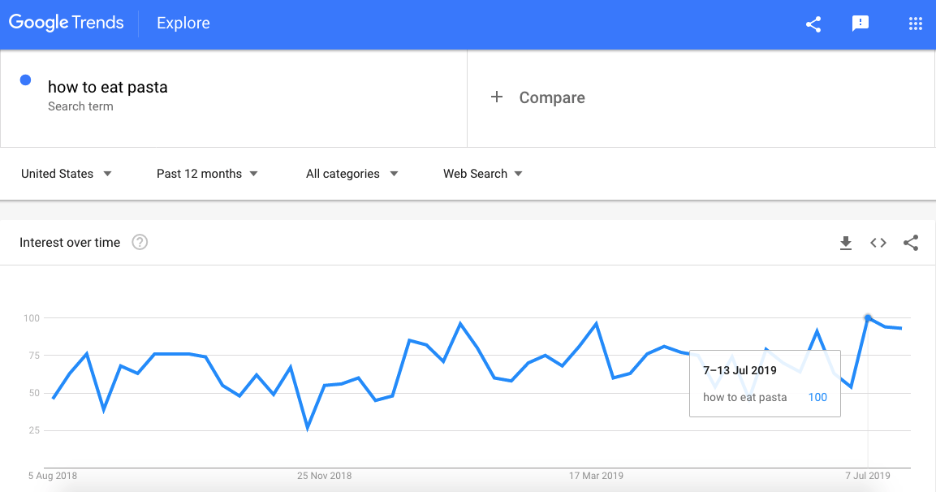
- Look at search terms and volume. Use tools like Google Trends to look up the types of searches your audience is conducting, or which queries have the biggest search volume. This data should influence your focus area and the name of your video.
2. Create a Script and/or Storyboard
Next, you’ll want to create a script and/or storyboard to guide your video shoot. So, how do you write a tutorial?
- Decide on a format. Will you do a voiceover to explain each step? Include titles? Use animations or do a live demonstration? These elements will often depend on your video editing resources. If you lack editing expertise, shoot someone explaining the tasks in one continuous shot. If you have help with editing, consider using voice-over narration, titles, and more. (Note: People learn better with both visuals and narration.)
- Write your steps out. Keep each step short and concise. Review if the flow is logical (or ask a colleague to have a look). Use the first or second person for your instructions so people feel like active participants. Consider how layover graphics (like arrows, circles, etc.) could direct viewer attention to important details. You may also want to highlight common mistakes to avoid.
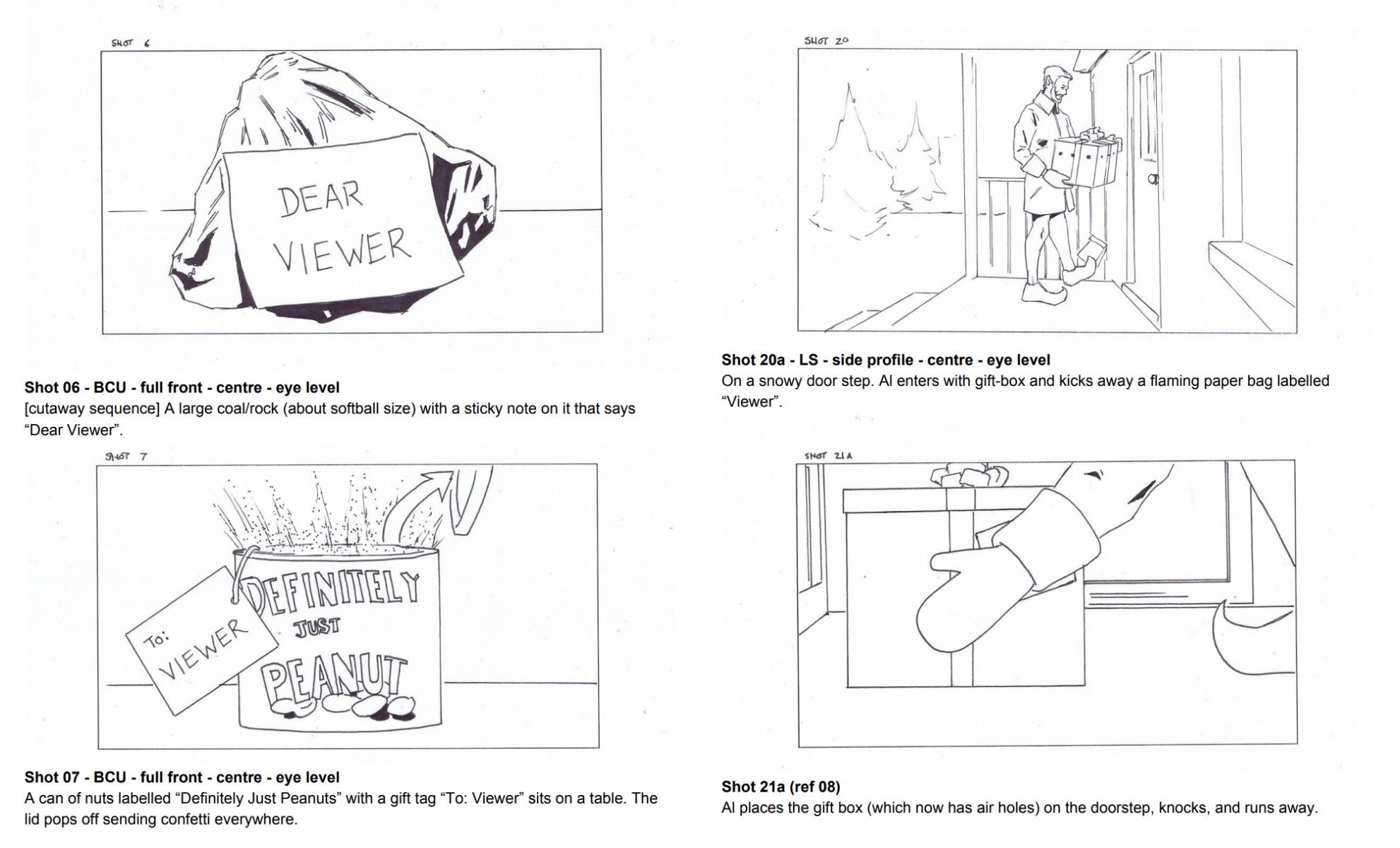
- Create a storyboard. A storyboard outlines the shots you want to see on camera, plus other directions for sound, narration, etc. Take each step and describe what will be seen and heard, plus titles and/or graphics needed. This will guide you on shoot day and for editing in post-production.
These storyboard frames from Vidyard’s holiday video give you an idea of how you might storyboard a how-to video.
(Not much of an artist? No worries! There are free tools that make it easy to sketch out a storyboard even if your drawing skills are somewhat lacking.)
3. Gather Equipment and Talent
Next, gather all the equipment, materials, and people you’ll need to make your video. For a live action production, this may include:
- Camera (or phone)
- Tripod
- Lights
- Microphone
- Backdrop or neutral workspace (that’s quiet!)
- Set pieces or props
- Narrator or live actor
- Behind-the-scenes help/operators
- Screen recording software
Learn more about choosing the right video equipment.
Consider scheduling a rehearsal. This lets your actors and/or team practice before going on camera, which will make shoot day more efficient and successful.
4. Record Your How-to Video
Here are a few tips for shoot day:
- Consider recording audio narration separately. This lets you better control and edit the sound quality and instructions later.
- Test your audio and visual quality by taking a few shots and watching a playback before recording the entire video.
- Leave some time in your schedule for reshoots, delays, mistakes, or trying out impromptu ideas or angles.
No more than a few minutes. The shorter you make your video, the more views you’re likely to get, which can improve your rankings and the chances of being found on search engines. Limiting the length will also help you focus on providing value and creating a good pace so viewers don’t get bored. Learn more about video length in our complete post on the topic.
5. Edit Your Video Tutorial
To edit your how-to video, you’ll need video editing software (there are options available for any budget and skill level).
Here are the steps to editing your instructional video:
- Upload the video, audio, and/or graphic files to your video editing software
- Trim your video clips and place in logical order
- Add effects (like titles, graphics, etc.).
- Review it (or have others review it) for flow, timing, etc.
- Edit the audio levels and transitions
- Do color correction, if needed
- Export the final video
Save your video in a popular format such as a MP3, MP4, WMV, or MOV file for maximum flexibility (some tools also let you export directly to social channels, such as YouTube). Export at a quality level between 1080p or 720p so the video output is crisp without the file size being too large.
6. Upload and Share
There are a few things you can do to make it easier for people to find and enjoy your video:
- Choose an enticing, value-based, concise title
- Include important keywords in your video description
- Create a shortened preview for social media
- Ask influencers in your space to share the video
- Consider creating more videos to increase your profile and links between videos
And, of course, there are plenty of channels where you can promote your video:
- Your website
- Video repositories like YouTube
- Your support portal or knowledge base
- Social media channels
- Relevant online communities
- Email newsletters

Vidyard Hosting makes it easy to leverage the power of video across your business.
What Are Some of the Best How-To Videos?
So, what makes a good video tutorial? They’re clear, well-produced, and (most importantly) helpful—without being overly promotional.
Here are a few more video tutorial examples and best practices to help you make your instructional videos more interesting.
1. Highlight Expertise: “Former FBI Agent Explains How To Read Body Language” by WIRED
To entice people to view your video, consider highlighting the expertise of the person giving the instruction. This video is structured as an interview with a well-trained expert, with B-roll footage helping to illustrate his insights further.
2. Use Great Visuals and Value-Based Statements: “How To Get Big Volumized Hair (Easy and Affordable)” by ThatsHeart
Businesses can take a cue from beauty and style bloggers, who use visuals to hook users. The preview image for this hair styling video shows the “Before” and “After” results of the video, which would persuade users to watch.

ThatsHeart also uses bright lighting and a neutral background as a backdrop for the video. While you don’t need a fancy setup, look for natural lighting and a non-distracting background to keep the focus on your instructions.
Also, notice how the benefit-oriented tag to the end of her video’s title (“Easy and Affordable”). This is a great way to highlight the value users can expect to receive if they watch your video.
3. Create A Strong, Consistent Brand: “Cisco Tech Talks” by Cisco
Cisco gave their small business-focused tech tips video series a name (Cisco Tech Talks) and used the same actor, background, music, and titles to create a consistent theme throughout the series.
Each video is also around the same length (under two minutes) and focuses on a specific aspect of their software (which makes it easier for users to find the right video answer to their product-related questions). All of these factors make the Cisco brand appear knowledgeable and professional.
4. Focus On Your Video’s Title: Best Interior Detailing Tricks by AMMO NYC
You may wonder why this video was chosen for this list since “how to” isn’t in the title. However, because of the interesting title (“best” and “tricks” stand out), it gets more clicks than other “how to”-based car detailing videos, and is ranked No. 1 on search results.
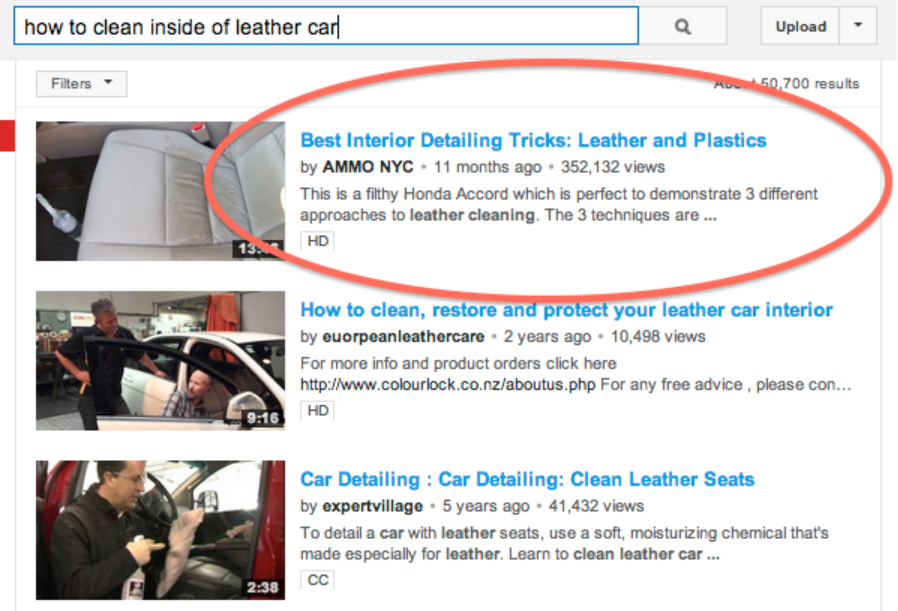
Putting keywords into your video title doesn’t guarantee it will rank. So think about what will entice people to click and watch first.
Planning on making a how-to video of your own? Vidyard can help you share it with the world.
Ready to make a how to video? This list covers all the things you need to know to get it right.
How To Videos Checklist
Your go-to list of all the things you need to remember when making how-to videos.