Prospecting and Intros
Stand out and improve response rates.
 Sales
SalesGenerate more pipeline and close more deals.
 Sales Support
Set your sales team up for success.
 Marketing
Host video content and convert viewers into leads.
 Converting and Closing
Connect with buyers and close more deals.
 Corporate Comms
Create and deliver an internal communications strategy.
See Vidyard in Action →
“Personalized Vidyard video messages drove an 8x improvement in click-through rates and a 4x improvement in reply rates.” Read More
 Blog
BlogThe secrets to virtual selling and video best practices.
 Video Agent Hub
Case studies and how-to videos for every revenue use case.
 Knowledge Base
How-to and help articles for all things Vidyard.
 Fast Forward
Expert advice on all things virtual selling.
 Templates
Free sales templates for every stage of the deal cycle.
 FAQ
FAQGet the answers to your top Vidyard questions.
 AI Resource Hub
Guides and ideas for using AI in your workflow.
 Case Studies
Learn how our customers win more with Vidyard.








Video Thumbnail Guide: How to Inspire Clicks
May 25, 2021
·
6 min read

Christina Newberry

Your video thumbnail is the gateway to your content. Like a movie poster, it should convey everything a potential viewer needs to know to compel them to watch.
You’ve put a ton of effort into planning, filming, and editing your video, and you’re confident it’s great content that viewers will love. But what if they never get a chance to see it?
Your video thumbnail is the gateway to your content. Like a movie poster, it should convey everything a potential viewer needs to know to compel them to watch.
Sure, your video platform will generate an automatic thumbnail for you. But would you go to see a movie if the poster was just a random (and possibly blurry) frame from the film?
Perhaps it’s no surprise that 90% of the top-performing videos on YouTube use a custom thumbnail. As viewers scroll through search results and recommended videos, your thumbnail needs to grab their attention and inspire them to press play.
Table of Contents
What is a Video Thumbnail?
A video thumbnail is a single image that represents your video in search results, social media previews, and website embeds. The thumbnail’s job is to tell viewers at a glance what your video is about and why they should watch.

Host, manage and share your on-demand webinars and virtual event content.
How to Make Thumbnails for Video
There are plenty of free online tools that make it easy to create a custom thumbnail for your videos. Here are a couple of our favorite YouTube thumbnail maker tools. Of course, you can also use these tools to create video thumbnail images for other platforms.
Canva YouTube Thumbnail Editor
With a library of hundreds of different designs and YouTube thumbnail template options, Canva makes it easy to create a great-looking thumbnail with just a few clicks.
- Choose a template
- Add banners, icons, and other graphic elements, or upload your own image
- Choose your fonts and add your text
- Choose your colors
- Download your YouTube thumbnail and upload it to the video platform of your choice

Adobe Spark YouTube Thumbnail Generator
Adobe Spark guides you through the process of making a custom thumbnail for YouTube or Facebook. The templates are grouped by theme, which helps you find the right look for your project.
- Choose whether you want to create a thumbnail for Facebook or YouTube
- Upload a photo or choose from the free stock imagery
- Edit the text and change fonts and colors
- Download your thumbnail and upload it to the video platform of your choice

Now that you know how to make video thumbnail images, here’s how to add them to your videos.
How to Change the Thumbnail on a YouTube Video
The recommended YouTube thumbnail dimensions are 1280 x 720 pixels. To add one:
- On a new video: From the upload video screen, scroll down to Thumbnail and click Upload Thumbnail
- For an existing video: Select the video from your channel, click the blue Edit Video button, scroll down to Thumbnail and click Upload Thumbnail
How to Change the Thumbnail on a Facebook Video
The recommended Facebook video thumbnail size is 1200 x 628 pixels. To add one:
- On a new video: From the Add Video screen, click Thumbnail in the right column, then scroll down to custom image and click Add Image
- For an existing video: Select the video on your page and click the three dots icon at the bottom right, then click Edit Video
How to Add a Custom Thumbnail on Vidyard
Upload the highest resolution image possible for your thumbnail and Vidyard will automatically resize it to fit the player.
- From the Vidyard dashboard, click Content, then Players
- Hover the cursor over a player and click Thumbnail
- Click + Upload New
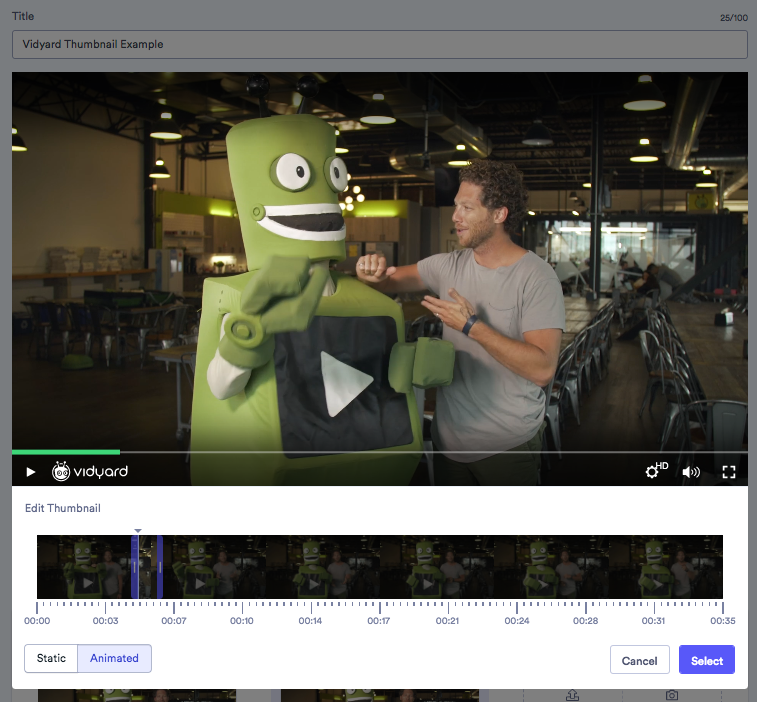
The free version of Vidyard offers four options for setting your thumbnail. Simply click on your desired option on the edit page to set your thumbnail.
- Static Thumbnail—Vidyard will automatically set a still image from your video as the video thumbnail
- Animated Thumbnail—Vidyard will automatically generate an animated GIF of a clip from your video to use as the video thumbnail
- Custom Thumbnail: Upload—Choose an image from your computer to set as the thumbnail (Vidyard will automatically resize it to fit your player)
- Custom Thumbnail: Take a Picture—Launch the Vidyard Chrome extension to take a photo using your webcam to set as your thumbnail (Note: This tends to work best for webcam videos as this helps ensure the thumbnail is consistent with your video content)
- Select From Video—Select either a single static point in the video as a thumbnail or choose a short clip to use as an animated GIF

Video Thumbnail Best Practices
1. Declutter
Use an image that’s simple, clear, and easy to see and understand. Use the rule of thirds to arrange your content effectively. The quickest way to understand the rule of thirds is to turn on the gridlines on your phone camera. Try to place the important content along the lines, or where the lines meet.
Here’s a good example of the rule of thirds in action from Binging with Babish.
Try using only one or two faces or subjects. Zoom in so you can see facial expressions or the fine details of the product. If you add text to your thumbnail, stick to a few words that are easy to scan, with a font that’s easy to read on screen.
2. Focus on Faces and Emotions
Facial expressions give a preview of the emotions your video will evoke. If you can hint that the content of the video is shocking or will change the viewer’s current perspective in some drastic way, this is a bonus. But only if it’s really true! (See No. 6.)
Kid vloggers Vlad and Nikita (and their mom, natch) make great use of facial expressions to create interest in their videos.
To ensure you have great facial images for your thumbnail, take some still photos during filming. This way you avoid that weird “you caught me while I was talking” face in your thumbnail while still having imagery that’s consistent with the look and feel of your video.
3. Manage Color and Contrast
A dark image is hard to see, and unlikely to catch the eye. Use bright and contrasting colors to make your thumbnail pop.
If your video doesn’t have bright backgrounds or subjects, you can change the background color of the thumbnail using image editing tools like those mentioned earlier in this post. Take a look at how Yoga with Adriene uses light colors and white banners to create a consistent look and feel for her videos that allows the text to pop.

For a quick test, try looking at your thumbnail while squinting. Can you still tell what it’s about?
4. Try Animation
An animated thumbnail is a great, eye-catching way to dress up your video, and even show a hint of the action that your video offers.
You can use an animated thumbnail with a online video marketing platform like Vidyard. This unique type of thumbnail stands out from the crowd. It can be especially powerful when used in your email marketing.
One thing to note with animated thumbnails is that although they catch the attention of your viewers, they are not a fully accessible option. So anyone needing to use accessibility tools like a screen reader will not be able to read the animated video thumbnail.
If animation is key to the message you want to convey, then consider making it less than 5 seconds and adding alt text if possible.
In this video, Pat grabs her prospects’ attention by using everyday office supplies to create an eye-catching gif thumbnail.

5. Include Your Branding
Add an icon or image that makes it clear the video belongs to your organization to help build trust with your viewers. The History Channel includes its logo on all video thumbnails, making it easy to spot at a glance that the content is from a credible source.

Consistent watermarks and branding are also a quick and easy way to identify a number of videos as a series. If you’re creating a video series, create a thumbnail template and use it to tie your videos together visually while saving yourself some time.
6. Don’t Use a Clickbait Thumbnail (But Do Use Drama When Appropriate)
Your thumbnail must relate to the content of your video. Fooling viewers into watching the first few seconds of your video is pointless, and can even be harmful. If people often leave your video right after clicking, your video will become less discoverable.
That said, if there’s something truly dramatic or shocking in your video, don’t be afraid to call it out. Use your thumbnail in combination with your title to create excitement, then make sure you fully deliver on your thumbnail’s promise.
This video from College Humor delivers on the thumbnail’s shocking premise: Everyone Should Eat Bugs (And You Already Do).
7. Use High Resolution
Yes, thumbnails are usually small. But your thumbnail appears full size if your video is embedded on a website, which could be viewed on a large monitor, or even a TV.
Don’t lose out on views because your thumbnail looks blurry or pixelated at a larger size.
Host, manage and share your on-demand webinars and virtual event content.
The Best Video Thumbnails for Virtual Selling
Now that more sales interactions need to happen virtually, many sales reps are turning to user-generated video to make personal connections when they can’t be there face to face.
A big part of what makes video emails for sales so effective is how quickly you’re able to grab a prospect’s attention and get them to hear what you have to say.
With a virtual selling tool like Vidyard, you can one-click record and send a video in an email where it automatically inserts a video thumbnail with a “play” button.
By having a dynamic and engaging video thumbnail, you can do something special or specific to grab the eye of your prospect or client.
Here are some great examples of different video thumbnail options you can use for your sales videos.
The Whiteboard Technique
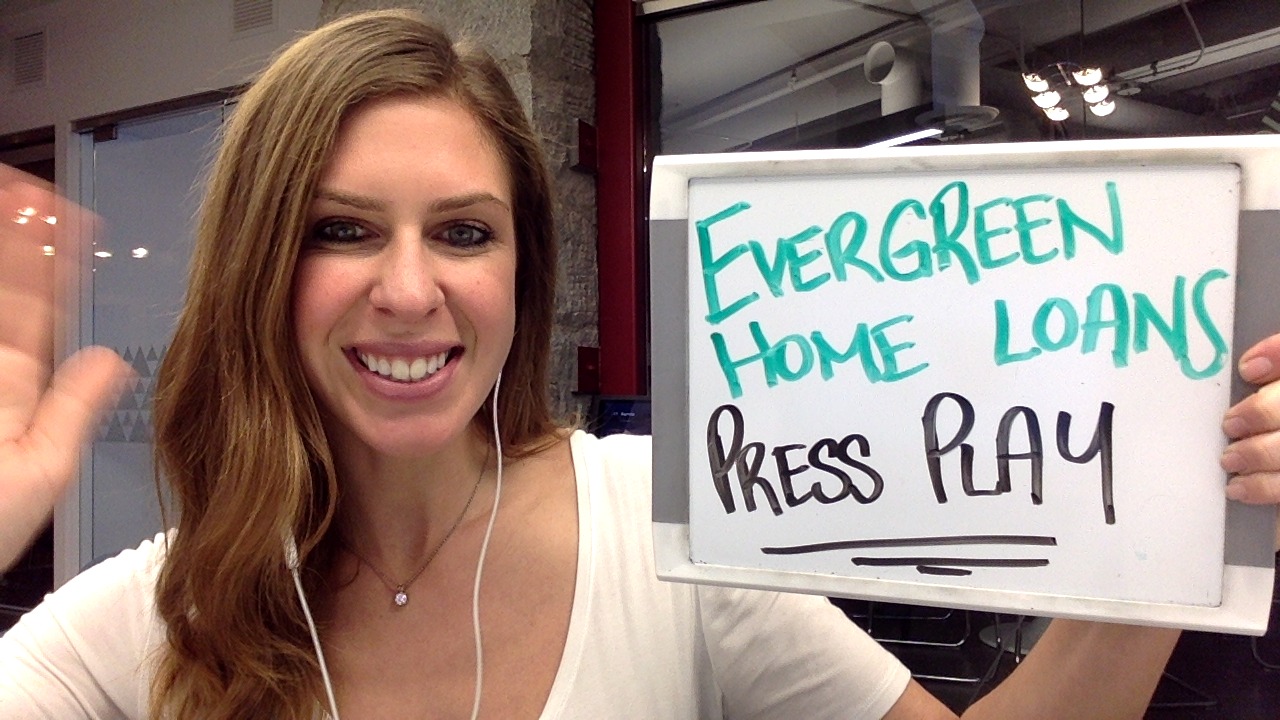
A personal and eye-catching way to start off a video and grab a great video thumbnail at the same time is to write a message on a whiteboard to hold up to the camera.
Whether it’s a prospect’s name, a fun celebration message, or a drawing, just make sure that it will resonate with the person you are sending it to.
Vidyard Commercial Account Executive Alana Couzelis nails the video production basics in this A+ prospecting video example. She used a whiteboard to personalize the video thumbnail that would show up in a client’s inbox and grab their attention.
Use A Prop
Don’t be afraid to get creative and use a prop to connect with your audience in your thumbnail. Do some research before you hit record, on what they sell or what they like, and work with what you can find. If you’re making a sales video to someone who works in publishing, sit in front of your bookshelf or hold your favorite book up. If you’re prospecting someone who works in the travel industry, consider wearing a fun beach shirt and hat. Or if you find out the prospect is a big Star Wars fan, wave a lightsaber around or borrow a friend’s Star Wars t-shirt to wear.
In this excellent video prospecting example, Terminus’ Morgan Gillespie uses her prospect’s passion (by having a beer as a prop) to deliver a great analogy with an impossible-to-resist thumbnail.

Get Creative
If you enjoy recording and creating videos, don’t be afraid to try out new ideas and even play around with editing if you have the time. Using a transition, putting in an eye-catching virtual background or even adding background music can be great ways to spice up your video.
In this video, Chris from BabelQuest uses fun transitions to keep the story flowing by interjecting flashes of images to hit home his core message. The result? One outreach his prospect couldn’t ignore.

It’s a Thumbs Up for Video Thumbnails
There are so many wonderful examples of how sales reps use video thumbnails to their advantage when prospecting in our Video Inspiration Hub, so take a look and get inspired to create your own video, and video thumbnail.
This post was originally published on January 29, 2020. It was updated on May 25, 2021.