Personalized Video: Use Cases, Getting Started, & Top Platforms
November 15, 2025·11 min read

Discover how every team in your organization can use personalized video with use cases, real-world examples, and how to pick the best platform.
We explore how teams across every organization can leverage personalized video through practical use cases, examples, and guidance on choosing the right platform.
Personalized video is a video that’s customized to an individual viewer and can help form trusting relationships.
Everyone likes to feel special. That’s why recording and sending a personalized video message is the perfect way to catch your viewers’ attention and engage them.
Every team can find ways to use personalized video including to increase email conversions, book sales meetings, boost landing page sign-ups, increase event attendance, improve customer satisfaction, build pipeline, and more.
Keep reading to learn more about how to get started and scale personalized video across your entire organization today.
What is personalized video?
A personalized video (or personal video) is a video that is created and customized for a specific individual viewer.
Personalized videos can be recorded and sent to individual recipients to book a meeting, offer a micro demo, walk through a proposal, provide customer support, or can even be used internally for team communication and collaboration.
And when we say “personalized,” we don’t just mean adding someone’s name to the video’s title. It means speaking directly to a specific person one-to-one with a message tailored just for them. Using tactics such as an eye-catching video thumbnail with their name written on a whiteboard, incorporating a prop that will grab their attention, or even creating a screenshot video that hovers over their LinkedIn profile or company website personalizes the experience that much more.
There are countless creative ways to approach personalized video, and there’s tons of proof of why personalized video can help you cut through the noise and shine.

The benefits of personalized videos
We live in a world where thousands of sales and marketing messages bombard us daily. That means it’s tougher than ever to stand out, keep audiences engaged, and build memorable relationships. But by treating each prospect and customer as an individual, personalized video can help you connect.
Benefits of personalized videos include:
- Breaking through the noise
- Higher email open rates
- Higher click-through rates
- Higher response rates
- Generating more prospect engagement
- Building relationships that drive deals forward
Why does personalization work so well? As the motivational legend, Dale Carnegie said, “A person’s name is to him or her the sweetest and most important sound in any language.”
People crave personalized experiences. And marketers are giving them what they want: 64% of teams utilizing personal video are using it for brand awareness and demand generation, 45% for event and webinar follow-up, and 42% for newsletter content.
While personalized elements tap into people’s desire to be acknowledged, doing it through video intrigues them..
As an added bonus, video in an email can reduce inbox fatigue and help recipients retain more of the message when compared to text-based email. Our brains are programmed to store visual memories, and studies show that people are 13% more likely to remember details from video emails over text emails.
But it’s not just a novelty. Most sellers who use custom-recorded videos agree that video emails produce more opens, clicks, and responses than text emails.
Getting and keeping your audience’s attention serves a larger purpose — building a relationship. By personalizing videos, you build one-on-one connections that can make viewers feel more positively about you and your product or service.

How to make a personal video
Creating a personalized video is easier than you think. There are many types of sales videos out there, but a personalized video is one of the highest-performing. In our 2025 Future of Revenue Report, we found that 93% of revenue leaders using video say they’ve seen positive results!
Follow these steps to create a compelling, personalized video!
Get your gear set-up
Leveraging an online video platform like Vidyard enables you to record, send, and host your videos all from one place. Now it’s time to get ready for production. You can start recording personalized videos with our free Chrome Extension or get started with a free trial today.
Once you’ve got the software, set up your webcam or mobile phone and check your microphone and audio settings. Lighting is also an essential piece of the puzzle. These days, ring lights are a popular and easy option, but if you don’t have one, just make sure your overhead lights are on, and you can see your face clearly in the viewfinder.
Do your research and plan what you want to say
Before you press record, do a little research on who you’re sending a video to. Look at their company website and their LinkedIn profile. You can also leverage generative AI tools like ChatGPT or our free AI video script generator to help in the research and discovery phase. Just make sure you’re validating the information that comes back, contacting the right person for your outreach, and identifying some details you can use for creating your sales pitch.
 How agentic AI and video are reshaping GTM strategies in 2025 Download now
 For example, if you see your prospect is a big fan of hiking, then try to weave that into conversation…or grab your best hiking jacket to wear in the video. Or, if your prospect mentions they’re an avid reader on their profile page, film your video in front of your bookcase to show a mutual hobby.

Types of personalized videos
Many online video platforms will give you various options for filming styles. Vidyard has three options to choose from: Selfie-style, screen share, or hybrid (both selfie-style and screen share).
A selfie-style video is an easy format to record. All you need to do is set your webcam up facing you, ensure your lighting is good, check that your microphone and audio work, and hit record.
A screen share video is when you record what’s on your computer screen and audio from your microphone. It’s a great way to show and tell. Screen share videos are often used for asynchronous video presentations, demo videos, and explainer videos. But don’t just get stuck in the sales/marketing use case! Teams can also screen share videos for contract reviews, legal document reviews, annual roundups, and internal training.

Why choose one style of video when you can have the best of both worlds? A hybrid video combines a screen share video and a webcam video. Vidyard does this by putting a bubble on the screen that shows the webcam feed of your face.
This style of video performs very well. Over half of sales pros who leverage the hybrid video format report that it delivers the highest response rate.
Below are the three types of personalized videos that you can record in either the selfie style, screen share, or hybrid format.
Hyper-personalized video
A hyper-personalized video is a traditional one-to-one video where you are speaking directly to your prospect or recipient. It can be used for various use cases, like sales prospecting and outreach, internal asynchronous communications, technical support, and customer service.

Account-based personalized video
An account-based personalized video is personalized for an account, like a team or organization, rather than an individual. This form of video is scalable while still giving the recipient that white glove treatment.

Non-personalized video
A non-personalized video is just how it sounds — not personal. But despite the lack of naming an individual or team in the video, that doesn’t mean you can’t still add a personal touch. For example, create a playlist of general content, then record a quick selfie-style personal video to put in the playlist’s first slot. The viewer will see that personalized video first, making the entire playlist feel like it was made just for them.
Where to use personalized videos
There are no rules about when and where to use personalized video — only possibilities. You can improve your performance at practically every funnel stage, from sales and marketing to customer success.
While we’ve given a few use cases already, the possibilities really are endless.
Personalized video email
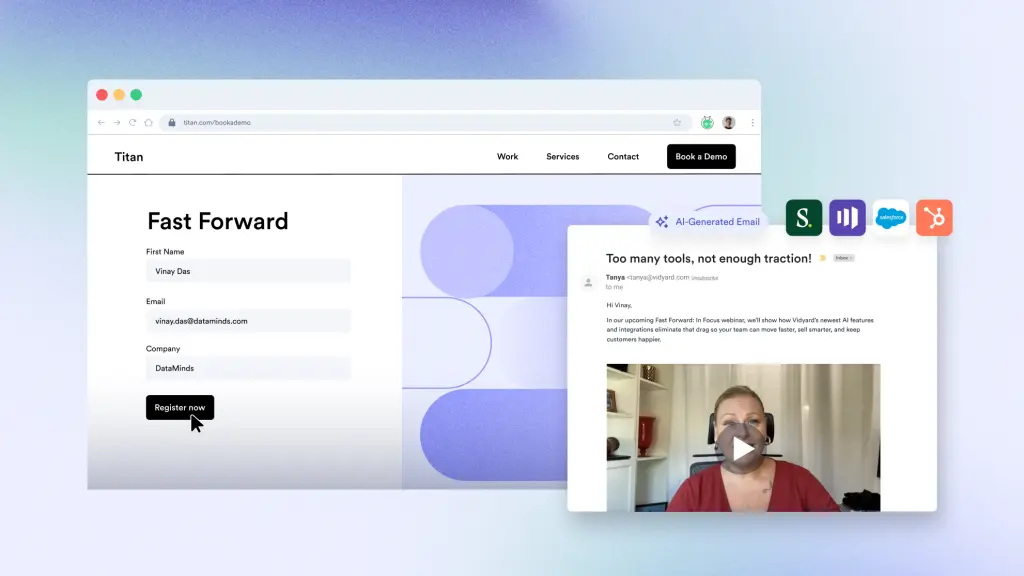
Personalized video is a great way to give your email marketing a boost. Increase email conversions by sending personalized videos for event invites and product or company updates.
Using sales video emails is also proven to increase open rates and response rates. It helps catch attention and build trust with prospects by putting a face to your name.
LinkedIn direct video message
Personalized video and LinkedIn go together like peanut butter and jelly.
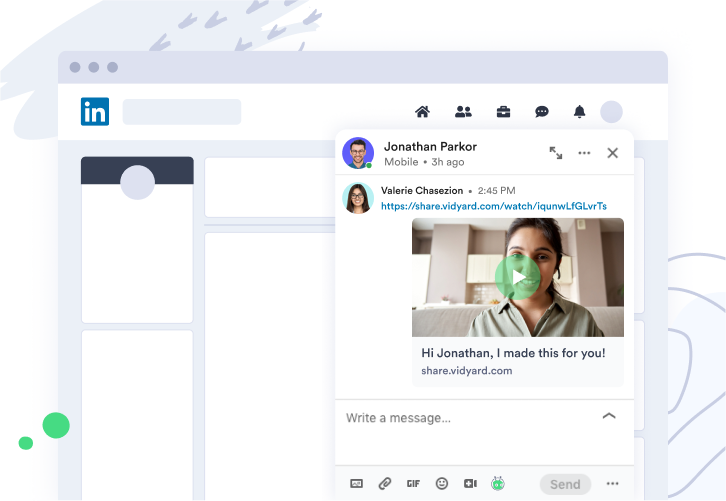
Many sales reps use LinkedIn to network, research prospects, and make connections. Using video in your outreach on LinkedIn is a no-brainer, and now it’s even easier because you can send direct video messages with the Vidyard Chrome extension.
It lets you easily record and send a video within the LinkedIn direct message composer. You can also share videos from your Vidyard library on your personal LinkedIn feed, in a direct message, or to a company page.
Account-based marketing strategies
Running an account-based marketing (ABM) program? Arm your sales teams to crack their top accounts with personalized video through several different channels. Building an ABM strategy with video provides multiple opportunities for touchpoints because it is so versatile.
To land a meeting with a key account, the team at Failure Island shot and produced this creative account-based personalized video.
If you don’t have the same polished production skills as the Failure Island team, that’s okay. A simple selfie-style video with some appropriate props and a tailored message can be just as effective.

Personalized Customer Support
Make your onboarding as inviting as the sales process with a personalized video welcome for all customers. You can also set a reminder in your calendar to create personalized video contract renewal reminders, product release announcements for top-tier accounts, and even holiday and celebration videos.

When customers need troubleshooting or product help, customer service reps can create screen share videos to illustrate how to navigate an issue or fix a problem.

Personalized video in sales and marketing, explained
We’ve given you a few ways to use video across your teams — but now we’re getting deeper into specific use cases how to generate leads and more revenue through personalized video with real-world examples from our customers.
Sales prospecting and outreach
ReviewTrackers was able to generate a 92% increase in response rates and 2x more new customer meetings by adding personalized video messages into their outreach strategy. Working with JB Sales, their small 9 person team was able to get these results in just 60 days!
Teams can use video in account-based selling strategies to target key accounts or send a video through LinkedIn (or SMS, if that’s a normal channel for your team to use!).
Marketing campaigns and lead engagement
Personalized video can bolster marketing efforts through dynamic personalized ads or video-based landing pages for specific target accounts.
Don’t forget about using personalized videos to re-engage those hot leads that fell off!
Demo and proposal videos
Asynchronous demos allow prospects to learn on their schedule. Sending a personalized proposal walkthrough that addresses specific pain points before an official demo helps them understand your products and services before that first call — making your time together on the phone more action-oriented as they already know the basics.
The Intelex marketing team used Vidyard to revitalize the company’s demo process by implementing a “Customize Your Demo” call to action. Prospects can request tailored video playlists based on their use case and desired features. In 2023, video was responsible for 52% of all marketing-influenced pipeline and became their #2 CTA on the site!
ou can also use personalized video after a demo to share a proposal or when renewing an existing customer.
Over one-third of sales pros who use custom-recorded video report that it shortened their sales cycle, and nearly half report increased close rates. Sending a personalized video before or after a demo can accelerate deals, engage multiple stakeholders, and reduce no-shows.
Customer success and support
You’ve closed the deal and now you want to make a great first impression when onboarding your new customer.
Pipedrive formed a growth team within its customer success organization and quickly achieved a 2x increase in upsellmonthly recurring revenue.
You can also use personalized video in technical support to show rather than tell. Coming up on a renewal? Both your customer success and sales teams can utilize personalized video for renewals and even upsell / cross-sell opportunities by highlighting past ROI and new features.
Internal communications
Looking to get your marketing, sales, and success teams on the same page? Most of the time, it’s easier to show rather than tell! Whether sending team updates, announcements, or even personalized training, video can help ensure your teams are aligned even across time zones.
The ROI of personalized video: metrics that matter
We’ve shared some of the amazing results our customers have achieved but the ROI of personalized video doesn’t stop there. If you need to convince a stakeholder that your team should be using video, send them this.
Personalized video statistics:
- Email open rates: 16% increase with video
- Reply rates: 26% higher with video
- Click-through rates: 16x higher for personalized video
- Customer success: 74% of customer success pros are satisfied with video results
If you’re already using video but are looking to prove ROI to get adoption across more team members or use cases,
First identify the measurable outcomes — like increased sales, lead conversions, or customer engagement. Calculate the total value generated from these outcomes, then subtract your production and distribution costs. Divide that figure by the total investment, and multiply by 100 to express ROI as a percentage: ROI = [(Gain – Cost) / Cost] × 100.
Tracking metrics like watch time, click-throughs, and conversions helps attribute impact accurately and refine future campaigns for even higher returns.
Best practices for implementing personalized video
If you haven’t realized yet, getting started with personalized video can be pretty easy. But if you need a little help, here are some best practices to get you going.
- Start with a pilot program (5-10 team members)
- Train sales teams effectively with templates and examples
- Create messaging guidelines for consistency
- Establish video length guidelines (we recommend 30-90 seconds)
- Measure and optimize performance weekly
- Scale gradually based on results and feedback
- Share wins to drive adoption across the team
To kickstart your efforts, check out our library of video templates.
Top 10 personalized video platforms in 2026
| Tool | Key features | Best for | Pricing |
| Vidyard | Enables sales reps to easily record quick, one-to-one video messages with screen sharing, personalize them with touches like name overlays, and monitor viewer engagement directly within the CRM. Vidyard’s free plan allows users to record up to 5 videos per month and 15 AI Avatar videos. | Individuals to enterprises | Free tier available (paid at $59/user/mo) |
| Loom | Quickly record your screen, camera, and/or audio only with basic analytics. | SMBs | Free tier available (paid at $15/user/mo) |
| SendSpark | Generate a single video template and automatically customize it for thousands of prospects including dynamic video landing pages. | Mid to enterprise teams | Starting at $49/user/mo |
| Hippo Video | Interactive templates, built-in teleprompter, advanced analytics, and integrations with top CRMs. | Mid to enterprise teams | Free tier available (paid at $20/user/mo) |
| Wistia | Built-in recording and editing tools with in-video lead capture forms. | Mid to enterprise teams | Free tier available (paid at $19/user/mo) |
| Pirsonal | Video creation with dynamic text, images, and voiceovers, plus interactive video landing pages | Mid to enterprise teams | Starting at $709/mo |
| Idomoo | Real-time rendering, branching based on actions viewers take, and CRM integrations. | Enterprise | Pricing available upon request |
| SundaySky | Dynamically adjust messaging, visuals, and narration for different audiences including flexible templates. | Enterprise | Pricing available upon request |
| ThankView | Branded, one-to-many or 1:1 video messages with viewer engagement analytics. | Mid to enterprise | Pricing available upon request |
| Brightcove | Content suite for video hosting, livestreaming, and advanced video encoding. | Enterprise | Pricing available upon request |
How to choose the right personalized video platform
While many personalized video platforms offer similar basic features, the difference really comes down to your use cases, needs, and level of sophistication.
While we’re a bit biased, we ultimately care about helping you make the best decision for your business. That’s why we’ve put together the following decision framework so you can be confident in getting started and scaling personalized video across your organization.
1. Assess your primary use cases
First things first, what’s the game plan?
Sales outreach, marketing magic (ABM or re-engagement), or customer success charm (onboarding, renewals)? Decide if this is a solo mission or a full-team takeover, and how many videos you’ll crank out monthly.
Pro tip: revenue teams should chase platforms built for slick, scalable personalization.
2. Evaluate your tech stack
Time to play tech detective. List your CRM, sales engagement tools, and any marketing or CS platforms in the mix where you’d like your video efforts to be integrated.
Figure out which integrations you can’t live without, and map how data needs to flow.
3. Consider your budget
Decide whether you’re going per-user or full-platform with pricing, then weigh it against your ROI goals, think cost per meeting booked, deal influenced, or customer retained.
Remember: cheap tools that no one uses aren’t a bargain. Always test-drive with a free plan or trial before committing.
4. Test ease of use
Don’t rely solely on promises — put the platform to the test.
Use a free trial to gauge how quickly your team can go from sign-up to sending their first video. Observe the learning curve, ease of navigation, and any adoption challenges that surface. Encourage multiple team members to participate in testing to get a well-rounded view of usability and engagement before making a final decision.
5. Review support and resources
Evaluate the quality of training materials and documentation, and test how responsive their customer support team is across different channels.
Explore available community forums, tutorials, and best practices. Robust support and resources can dramatically shorten your team’s learning curve and speed up time-to-value.
By the end of the trial, you want to be confident in your decision. Any hesitations and you should test out another option to really compare.
The future of personalized video: AI and automation trends
Are you a bit camera shy? Or maybe you’re looking for a way to scale creating and sending personalized videos to more prospects and customers?
Great news — that’s where AI Avatars and Vidyard’s Video Agent come in clutch.
AI Avatars enable teams to replicate themselves and record customized scripts without having to get in front of the camera. We’ve gone one step further and developed our Video Agent, that enable team to automatically create and send AI Avatar videos based on actions folks take such as requesting a demo or attending a webinar.
Want to test out creating an AI Avatar? You can create up to 15 free on our Free plan. Get started today!
We’re all about developing innovative ways to foster and grow your business through the power of video, and the future is bright! Think predictive personalized video based on buyer behaviors, integrations with conversational AI and chatbot tools teams are already using, and increased automations to reduce manual efforts involved in scripting, creating, and editing videos.
Stay tuned for more exciting updates by signing up for our newsletter.
Getting started with personalized video
It really is easier than you think!
Start small. Try a quick intro video for cold outreach, a re-engagement message for dormant leads, or a thank-you video post-demo. Track early wins like reply rates, meetings booked, and deal progression. Keep videos short, authentic, and consistent.
You can also tap into Vidyard’s extensive resources to level up your approach. With Vidyard’s all-in-one platform built for Sales, Marketing, and Customer Success teams, you can skip the tech headaches and jump straight to the fun part: creating, personalizing, and scaling videos that actually move the revenue needle.
From day one, you’ll be turning clicks into conversations (and conversations into customers).
Request a demo from our team to see our full platform (including new AI Agents) or get started for free.
Personalized video FAQs
What is the difference between personalized video and regular video?
A personalized video is tailored to an individual viewer using their name, company, or additional context, while a regular video delivers the same message to everyone.
Can I create personalized videos at scale?
Yes! You can absolutely create personalized videos at scale. By using templates, automation, and dynamic personalization tools, teams can tailor messages for hundreds of recipients while keeping each video relevant and engaging without having to record every one from scratch.
Which CRMs integrate with personalized video platforms?
Most personalized video platforms integrate with major CRMs like HubSpot, Salesforce, and Microsoft Dynamics.
What metrics should I track for personalized video campaigns?
Teams can track key engagement and impact metrics like video views, watch time, and click-through rates to gauge audience interest. Go deeper by measuring reply rates, meetings booked, deals influenced, and customer retention to connect video performance directly to revenue outcomes.
Is personalized video better than email for outreach?
Yes! Personalized video definitely has the upper hand over regular email outreach.
Our case studies show customers achieving up to 8× higher click-through rates and 4× higher reply rates than traditional text-only emails.
How long should a personalized video be?
For personalized outreach videos, keep it short and to-the-point—around 30 to 90 seconds is ideal for cold or initial touch-points. If you’re further down the funnel or diving into demos, you can stretch toward 1 to 3 minutes, but retention drops off rapidly beyond that