Prospecting and Intros
Stand out and improve response rates.
 Sales
SalesGenerate more pipeline and close more deals.
 Sales Support
Set your sales team up for success.
 Marketing
Host video content and convert viewers into leads.
 Converting and Closing
Connect with buyers and close more deals.
 Corporate Comms
Create and deliver an internal communications strategy.
See Vidyard in Action →
“Personalized Vidyard video messages drove an 8x improvement in click-through rates and a 4x improvement in reply rates.” Read More
 Blog
BlogThe secrets to virtual selling and video best practices.
 Video Agent Hub
Case studies and how-to videos for every revenue use case.
 Help Center
How-to and help articles for all things Vidyard.
 Fast Forward
Expert advice on all things virtual selling.
 Templates
Free sales templates for every stage of the deal cycle.
 FAQ
FAQGet the answers to your top Vidyard questions.
 AI Resource Hub
Guides and ideas for using AI in your workflow.
 Case Studies
Learn how our customers win more with Vidyard.
 Live Workshop Series
Showing you exactly how to put video to work.








How to Use a Video Library in Every Part of Your Business
Jul 15, 2023
·
10 min read

Chris Gillespie

Manage your video content with ease by building a video library. From general content control to privacy and permissions, video libraries are a must to help get a handle on burgeoning video content.
Do you have a sense of all the video content your company has created? Where it lives, and who has access to it? Chances are there’s way more than you think, and it’s turning into the wild west of access and version control.
Marketers feel the pain when the sales team can’t find that perfect testimonial that could have helped progress a deal. Or, maybe it’s for the comms leader when they spit out their coffee upon seeing a sensitive internal video circulating on Reddit.
At this point, you’ve likely reached an impasse in your video maturity journey. Your org has unleashed the power of video but has lost control over where the video content lives and who has access to it. People in this position have a stark choice: Either waste time searching countless sources to find what you’re looking for or get a sound video library in place and get organized.

Vidyard Hosting makes it easy to leverage the power of video across your business.
Table of Contents
What is a Video Library?
A video library is an owned video channel brands can use to manage all their video content or a collection of organized video content. A proper video hosting solution lets you build video libraries, manage privacy and permissions, easily update videos, and group like content together.
Leveraging a video hosting platform to organize your video content is like having your company’s own YouTube, only secured, branded, and controlled. It gives you the power to put your videos in all the right places and quickly create channels for events, departments, or products.
9 Benefits of Using a Video Library for Business
Whether you’re a global brand needing an enterprise video platform or a new startup searching for an easy way to manage video assets—the benefits of having a video library for your business are far-reaching. From making content easily accessible to your entire organization to ensuring that employees only share what you want. Below we’ll cover nine of the top benefits of building video libraries.

Get exclusive insight into how sales teams use AI-powered video. (Plus bonus playbooks to get you started.)
1. Creating a Central Hub for All Video Content
Your video library can serve as a central source of truth for video in your organization. You can store and share your video content in one spot with a video library. No matter where you post, embed, or share your video, it’s all coming from the centralized hosting offered by your video content management system.
2. A Video Library Lets You Collaborate Seamlessly
Video content management systems allow for easy collaboration between you, the rest of your team, and your entire business. With everything in one place, it’s easy for your team to find what they need when needed.
The days of getting messages asking for the latest video file version are no more—everyone who needs it has access to the most up-to-date file.
3. Reduce Storage and Server Costs
In addition to collaboration, having a video library eliminates the need to send files back and forth, ultimately allowing your business to save on storage and email server costs.
4. Flexible Control to Who Can Access Video Content
Video management software also allows you to determine who should be able to see or share content and when. Easily control access and permissions with advanced privacy settings.
5. More Easily Organize Video Content
Make it easier for your teams—marketing, sales, customer service, or internal communications—to find what they want.
Our video benchmarks have consistently seen video use within businesses grow exponentially year over year. The number of videos created across your org is much higher than anticipated. With that much video, you need an organizational system.
Whether you want to arrange video content by project, campaign, team, or something else, video libraries allow you to slice and dice content, organizing it into sections that make it simple for everyone to find what they’re looking for.
6. Ensure Proper Coding and Formatting Across Digital Channels
Video libraries hosted with a video platform like Vidyard allow you to share content directly from the library to various channels, including the ability to embed on your website and share via Slack, email, YouTube, and more. This eliminates the need to manually code and format your videos before uploading them individually to each platform.
7. Rake in the Video SEO Benefits
In addition to unlocking the SEO benefits of sharing your public video content on YouTube, having a video library for your business means that you can embed videos directly into your site and still reap the search engine optimization (SEO) rewards—all while maintaining the customer’s journey and tracking their engagement in your content.
For full video SEO impact, ensure you give your videos search-friendly titles, complete all metadata fields available in your video management system, and include relevant copy on the pages you embed them on.
8. Easily Make Changes to Your Video Content
You’ve uploaded and shared a video everywhere, but now you need to change it. Without a video library, you’d be stuck manually removing and replacing the video everywhere it lives. With one, it’s as simple as uploading a new file. The new file automatically replaces all the old ones, no matter where they are on the web.
9. Get Insights into Video Performance
Video libraries built with a video platform for business offer in-depth video analytics, allowing you to find out who’s watching your videos, how much they’re watching, and where. Find out how your content performs so you can do more of what works and less of what doesn’t.
Get exclusive insight into how sales teams use AI-powered video. (Plus bonus playbooks to get you started.)
How to Set Up and Organize a Video Library
When organizing and setting up your video library, a little pre-planning will save a lot of time and future pain as your video content continues to grow. Follow these three steps for the best chance of success.
1. Build a Proper Content Management Structure
First, you’ll need to land on a primary organizing principle for your content—i.e., department, region, and product. Then, consider any folders that should be nested beneath each branch. That could be by channel, content type, or market segment focus.
Think about any unique branding or other requirements to build into the structure.
From here, you’ll want to look at creating a visual to help identify connections between groups of videos and organize folders in a way that makes sense for your teams.
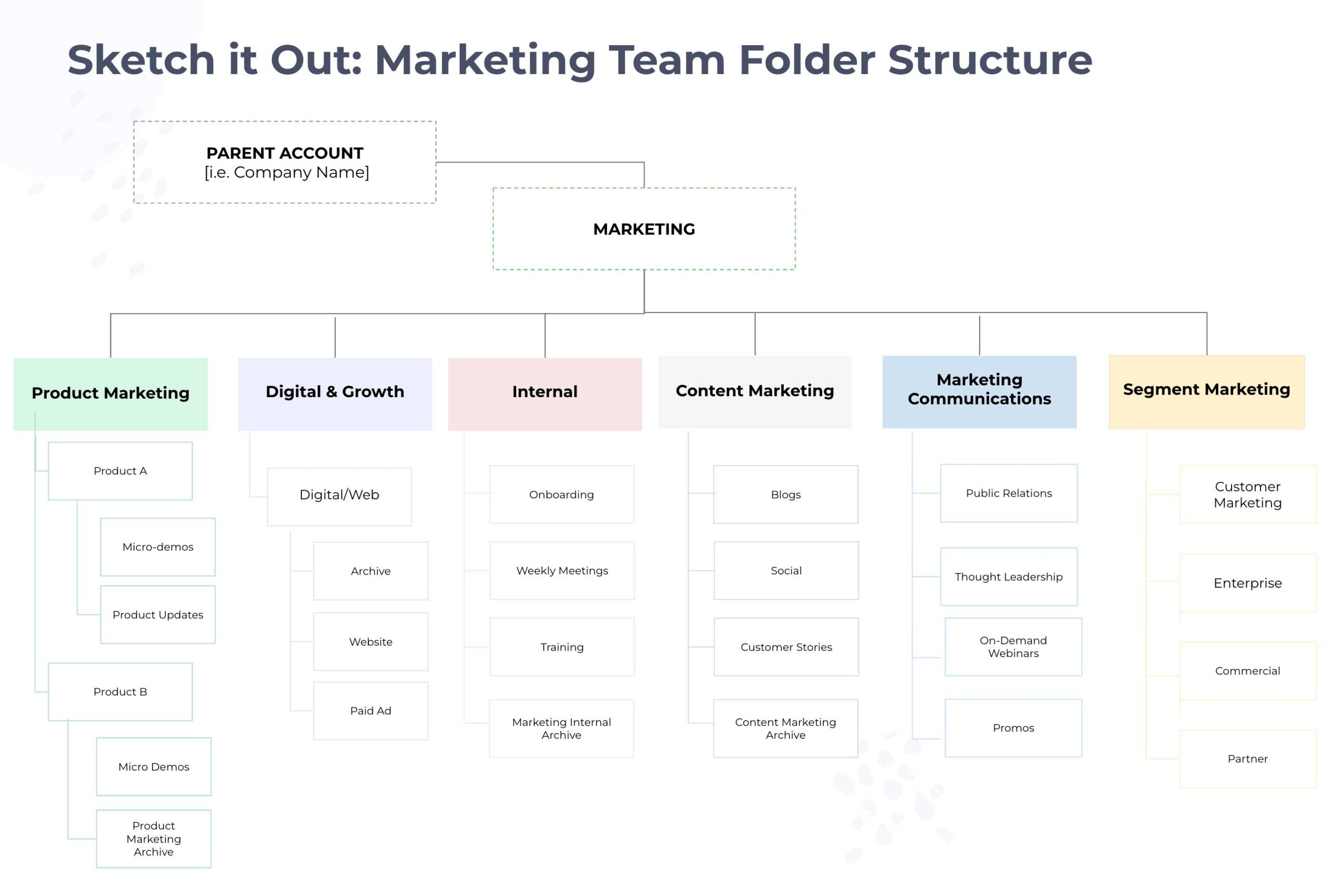
After visualizing, use this as an opportunity to audit videos and fix any disorganized or disjoined folder structures.
The Best Way to Audit Videos in a Library
- Pull a list of all video content and folders
- Look for similarities and differences in the videos stored within folders
- Apply your folder strategy and fix what needs fixing
2. Define Naming Conventions
After you’ve landed on the folder structure for your video library, it’s time to decide on consistent naming conventions. Give your folders a descriptive name so that team members can easily find content. You’ll want to be uniform with your naming conventions and use of characters. Finally, you’ll want to be specific in naming and labeling something internal vs. external.
3. Plan for Continued Growth
As both user-generated and traditionally produced video content continues to rise, planning for this continued growth within your org is essential. Consider how folders and content will grow and change over time, and plan accordingly. Including appropriately named archive folders can help differentiate active vs. legacy content.
Three Steps to Consider to Help Manage Video Library Growth
- Request for the new folder(s) is sent to the admin/owner of the library
- Admin reviews and determines if it aligns to structure and naming convention
- Admin actions accordingly
How GTM Teams Can Leverage Video Libraries
Regardless of role, video libraries across go-to-market (GTM) teams are a must. If you need some inspiration, check out some examples below.
Using Libraries for Video Marketing
Video libraries make the lives of your business’ marketers easier than ever by letting them manage and organize all their video marketing content in one place. And there’s more:
- Event marketing: Companies like Adobe use a Video Hub to organize videos for events and summits.
- Organize thought leadership content: Group videos together to demonstrate use cases and benefits, as Vidyard does with our Fast Forward on-demand content.
- Land account-based marketing (ABM) accounts: Personalize the videos each account can see so everything they discover seems relevant.
- Target verticals: Show prospects videos of companies like them that solved their problem with your product.
- Score leads: Set scoring rules based on viewers’ interest in a particular feature or product.
- Product marketing: Record videos to explain your products and keep customer-facing teams on message.
How Sales Teams Can Use a Video Library
Video messaging has become an increasingly popular tactic with sales teams. Whether for training or outbound prospecting, a video library can help your sales team be more efficient and close more deals. Additionally, a video library helps with the following:
- Outbound sales: Send customers links to testimonials in a video playlist that recommends other relevant testimonials.
- Target verticals: Send targeted playlists of videos so prospects can browse and continue to find relevant content.
- Sales coaching: Enablement and sales leaders can create a training library for the team’s funniest and most effective video pitches.
- Empower sales and solution consultants: Gather all the best sales demos in one place to offer consultants inspiration and ideas.
- Onboard new reps: Create a video onboarding sequence that explains everything from pitching to entering deals in your customer relationship management (CRM) system.
Provide Better Support and Experience with a Video Library
How-to videos are one of the most popular types of video, so it only makes sense that there’s plenty your customer service and support team can do with video. A video library makes it simple for teams to find the answers customers need quickly and easily. They can also:
- Help customers self-support: Offload support volume with a walkthrough video library that recommends other relevant self-help videos.
- Find videos faster: Create video hubs for each team, vertical, and use case that support managers can share publicly.
- Save time: Create a hub of videos to answer customers’ most frequently asked questions.
- Train the team: Gather the team’s best walk-throughs and support videos, plus compile customer reactions.
- Improve service quality: Leaders can view analytics data to see who’s watched what and alert support managers automatically if customers appear to need help.
Have Better Control and Access to Internal Videos
The advanced permissions in video libraries mean that internal communications teams can share content with employees without fear of leaking anything. But that’s not all:
- Provide on-demand help: Create an employee resource video library for everything from personal benefits information to what to do in an emergency.
- Lockdown sensitive videos: Restrict access at the video level based on the viewer’s domain, role, or business unit.
- Develop every department: Work with leaders from each department to create role-specific hubs for training videos.
- Hire more effectively: Help applicants and potential new hires get to know the business and its leaders through a video series.
- Update the company: Gather executive fireside chats and all-hands summit recordings in one place so nobody misses out.
It’s Time to Plan and Build that Video Library
Video libraries help leaders effectively power their businesses with video. Video libraries and video hubs can do so much for your teams. They keep prospects focused and moving along their journey, ensure sales and service teams always have suitable clips, and lock down access so sensitive videos don’t make the nightly news. If you want to learn more about getting a handle on all your video content, book a demo with one of our video specialists to learn more.
Vidyard Hosting makes it easy to leverage the power of video across your business.
This post was originally published on October 3, 2018. It was updated on July 15, 2023.