Prospecting and Intros
Stand out and improve response rates.
 Sales
SalesGenerate more pipeline and close more deals.
 Sales Support
Set your sales team up for success.
 Marketing
Host video content and convert viewers into leads.
 Converting and Closing
Connect with buyers and close more deals.
 Corporate Comms
Create and deliver an internal communications strategy.
See Vidyard in Action →
“Personalized Vidyard video messages drove an 8x improvement in click-through rates and a 4x improvement in reply rates.” Read More
 Blog
BlogThe secrets to virtual selling and video best practices.
 Video Agent Hub
Case studies and how-to videos for every revenue use case.
 Help Center
How-to and help articles for all things Vidyard.
 Fast Forward
Expert advice on all things virtual selling.
 Templates
Free sales templates for every stage of the deal cycle.
 FAQ
FAQGet the answers to your top Vidyard questions.
 AI Resource Hub
Guides and ideas for using AI in your workflow.
 Case Studies
Learn how our customers win more with Vidyard.
 Live Workshop Series
Showing you exactly how to put video to work.








Sales Glossary
The sales industry is always changing and evolving. Keeping on top of those changes can be tough. The Vidyard Sales Glossary is your ultimate guide to important sales terms, definitions, concepts, slang, insider business jargon and more to keep you up to date with the latest in sales industry lingo.

a
- Account-Based Selling
- Account Executive
- Accounts Receivable
- AI Sales Script Generator
- Annual Recurring Revenue
b
- B2B
- B2C
- BASHO Email
- BOFU
- Business Development Representative
- Buying Intent
c
- Challenger Sales Model
- Channel Sales
- Closing Ratio
- Cold Call
- Cold Email
d
- Decision Maker
- Demand Generation
- Digital Sales Room
- Direct Sales
- Discovery Call
e
- End of Day
- End of Quarter
- Enterprise Resource Planning
- Entrepreneur in Residence
f
- Fast Forward
- Flywheel
- Forecasting
- Forward Revenue
g
- Gatekeeper
- Go-To-Market Strategy
h
- Horizontal Market
i
- Ideal Customer Profile
- Inbound Sales
- InMail
k
- Key Accounts
- Key Performance Indicators
l
- Lead
- Lead Generation
- Lead Qualification
- LinkedIn Sales Navigator
- Loss Aversion
m
- Marketing Qualified Lead
- Master Service Agreement
- MOFU
- Monthly Recurring Revenue
n
- Needs Assessment
- Negotiation
- Net Promoter Score
o
- Objection Handling
- On-Target Earnings
- Onboarding
- Outbound Sales
p
- Pipeline
- Platform as a Service
- Point of Contact
- Product Qualified Lead
q
- Quota
r
- Referral
- Request for Proposal
- Revenue Operations
s
- Sales Automation
- Sales Coaching
- Sales Cycle
- Sales Demo
- Sales Development Representative
- Sales Enablement
- Sales Prospecting
- Sales Qualified Lead
t
- TOFU
- Total Addressable Market
u
- Unique Selling Point
- Upsell
v
- Value Statement
- Vertical Market
- Video Email
- Video Hosting
- Video Messaging
- Video Prospecting
- Video Selling
- Virtual Selling
w
- Warm Call
- Warm Email
- Wireframe
What is InMail?
InMail is a premium feature on LinkedIn that allows a user to send messages to someone they aren’t connected with. With standard, free accounts, LinkedIn only allows members to send messages to each other if they’re connected. However, paying for a premium plan allows messages to be sent to anyone, regardless of your connection status. This is especially valuable for sales reps who want to contact new sales prospects.
Who Uses InMail?
While InMail is a feature of LinkedIn Recruiter licenses, it’s not used exclusively by recruiters. The average LinkedIn user may think it’s only used by hiring managers and recruiters because receiving those messages is common, but it’s a valuable B2B sales prospecting tool used by sales reps as well.
Sales reps use InMail for sales prospecting. It’s an excellent tool for conducting research and cold outreach. If a sales rep is looking up companies they want to pitch to, they can use InMail to start making connections. It’s commonly used for initial introductions to see if a lead is interested in hearing more about a company’s product.
It’s important to note that InMail restricts messages to 1,900 characters, so sales reps looking to utilize it should ensure their messages are direct, pointed, and enticing. It’s also important to note that if you’re using LinkedIn Sales Navigator, InMails are separated, and you get a certain number of credits you can use per month.
Benefits of InMail
Paying for this premium feature is worth the investment. InMail allows sales reps to do the following:
- Conduct outreach without needing a prospect’s address or phone number.
- Send messages to anyone on LinkedIn, including users with both basic and premium accounts.
- Use InMail reports to track detailed metrics of messages sent (this helps with improvements to your overall outreach strategy).
- Receive InMail credits back if the person you contacted replies to your message. You get a limited number of InMail credits per month and responses are rewarded with the credit being returned. If your messages are successful, you can keep using the same credits repeatedly.
Tips for Using InMail Effectively
Once you register for a premium LinkedIn subscription, it can be tempting to use InMail to contact every lead on your list. However, your outreach should be precise and targeted. Remember, you’re restricted to the number of messages you can send per month, and the length of those messages also has limitations.
To use InMail effectively, follow these tips.
Research First
Before you even start typing out your message, conduct as much research as possible. Narrow down your prospect pool and then decide on who you want to target first. The most time and effort should go toward qualified leads as they have the highest chance of converting.
Personalize Your Messages
LinkedIn users receive multiple sponsored ads and messages every week, so you need to stand out. Make sure your subject line is catchy and entices your prospect to open your message. Then, ensure they’re addressed by name and include references to their work and company. Let them know you’re serious about helping them achieve their business goals, and then explain exactly how your product can do so.
Personalizing your message and ensuring your prospect feels valued and appreciated is key.
Include Video Messages
The best way to stand out from the crowd is to send a personalized video. It humanizes your message and helps cement a positive relationship with your prospect. Make sure you create an appropriate video thumbnail to grab their attention and then include direct messaging in the video itself.
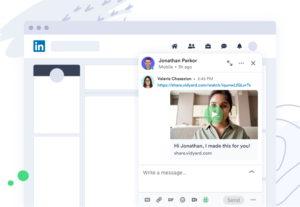
Sign up for a free account to record and share videos on your LinkedIn page and through direct message.
See how Vidyard can help your business grow with video.


See why the best sellers use video